CoreDNS 和 NodeLocalDNS 的域名解析

在 K8s 中,DNS 解析主要涉及以下两个组件:

  1. CoreDNS:主要负责集群内部域名解析。
  2. NodeLocalDNS:在节点本地提供 DNS 缓存,用于优化集群 DNS 查询性能。

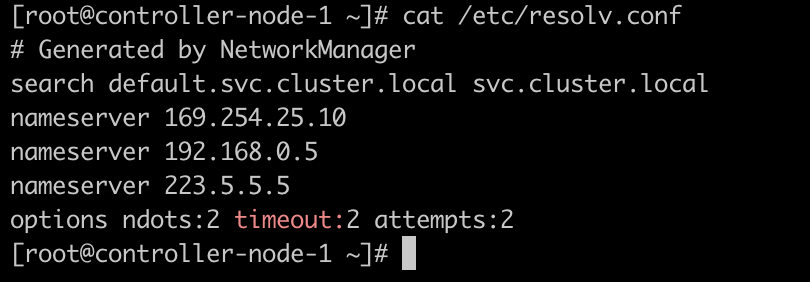
首先看一下这份的 /etc/resolv.conf 配置文件中各字段的含义:
1
2
3
4
5
6
7
8
9
10
11
12
13
14
15
16
17
18
19
20
21
22
23
24
25
# 指定搜索域。
# 当使用域名解析主机名时,如果主机名不是完全限定域名,系统会依次追加 search 中的后缀进行解析。
# 例如解析 test 时,会尝试解析:
# - test.default.svc.cluster.local
# - test.svc.cluster.local
search default.svc.cluster.local svc.cluster.local

# DNS 服务器地址。
# 如果集群启用了 NodeLocalDNS,这里通常是 NodeLocalDNS 的本地监听地址。
# 如果集群没有启用 NodeLocalDNS,这里通常是 CoreDNS Service 的 ClusterIP。
nameserver 169.254.25.10

# 其他 DNS 服务器地址。
nameserver 192.168.0.5
nameserver 223.5.5.5

# ndots:2 表示当查询名称中的点数量少于 2 个时,会优先追加 search 域进行解析。
# timeout:2 表示单次 DNS 查询超时时间为 2 秒。
# attempts:2 表示最多重试 2 次。
#
# 例如:
# - 解析 a 时,由于点数量为 0,会优先尝试追加 search 域。
# - 解析 a.b 时,由于点数量为 1,也会优先尝试追加 search 域。
# - 解析 a.b.c 时,由于点数量为 2,会先尝试按 a.b.c 作为绝对域名解析。
options ndots:2 timeout:2 attempts:2

在 K8s 中,workload 的 dnsPolicy 有四种类型:

  1. ClusterFirst:默认策略。与集群域后缀不匹配的 DNS 查询,例如 www.kubernetes.io,会由集群 DNS 服务器转发到上游名称服务器。
  2. Default:Pod 会继承所在节点的名称解析配置。
  3. ClusterFirstWithHostNet:对于以 hostNetwork 方式运行的 Pod,如果仍希望使用集群 DNS,应显式设置为 ClusterFirstWithHostNet
  4. None:Pod 会使用 dnsConfig 中显式提供的 DNS 配置。

CoreDNS

CoreDNS 主要负责集群内部域名解析,保证 Pod 可以通过 Service Name 访问集群内的 Service。也可以通过额外配置,使其解析指定的静态 Host。

1
2
3
4
5
6
7
8
9
10
11
12
13
14
15
16
17
18
19
20
21
22
23
24
25
26
27
28
29
30
31
32
33
34
35
kind: ConfigMap
apiVersion: v1
metadata:
name: coredns
namespace: kube-system
data:
Corefile: |
.:53 {
errors {
}
health {
lameduck 5s
}
ready
kubernetes cluster.local in-addr.arpa ip6.arpa {
pods insecure
fallthrough in-addr.arpa ip6.arpa
}
prometheus :9153
forward . /etc/resolv.conf {
prefer_udp
max_concurrent 1000
}
hosts /etc/coredns/Hosts {
ttl 60
reload 1m
fallthrough
}
cache 30
loop
reload
loadbalance
}
Hosts: |+
192.168.0.10 cqm.com

创建一个 dnsPolicyClusterFirst 的 busybox:

通过这个 busybox 解析集群内部域名,并通过 tcpdump 抓取 53 端口的包:
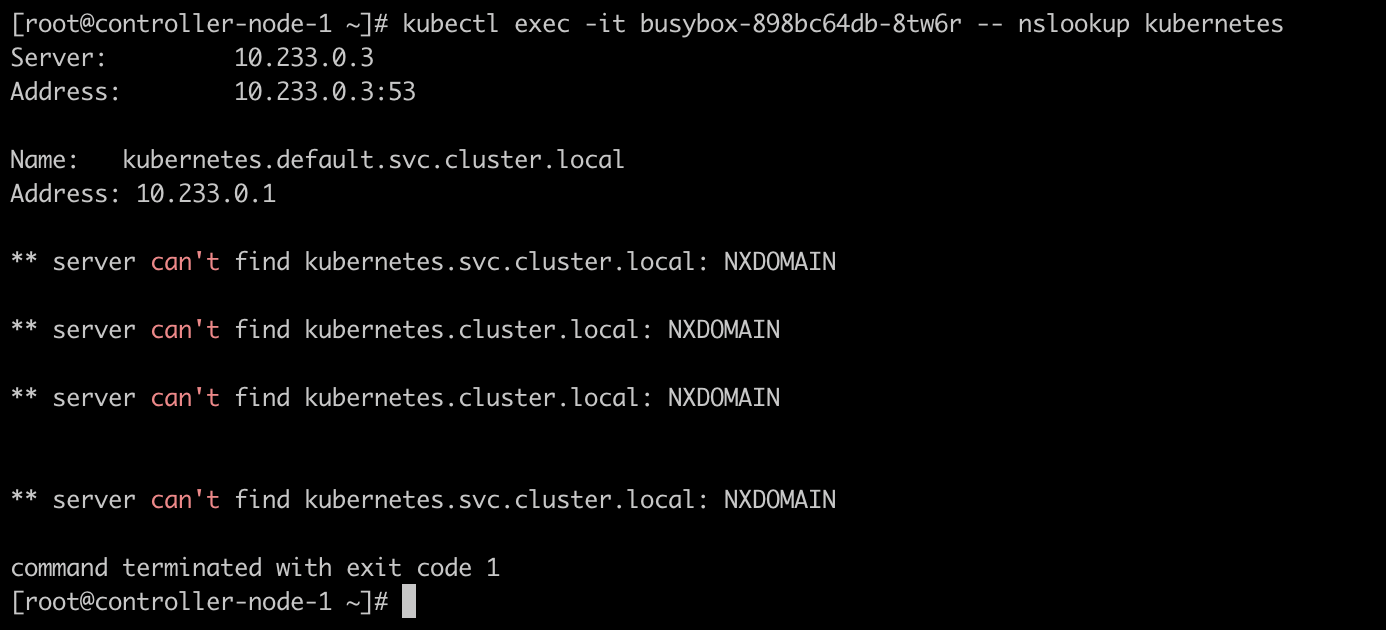
可以看到,Pod 会根据 search 配置向 CoreDNS 发起多次查询。

请求路径如下:

1
Pod -> CoreDNS -> Pod
1
2
3
4
5
6
7
8
9
10
11
12
13
14
15
16
17
18
19
20
21
22
23
24
25
26
[root@controller-node-1 ~]# tcpdump -i any -nnvvv 'port 53 and host 10.233.0.3 and host 10.233.74.83'
tcpdump: listening on any, link-type LINUX_SLL (Linux cooked), capture size 262144 bytes
22:52:20.447820 IP (tos 0x0, ttl 64, id 37856, offset 0, flags [DF], proto UDP (17), length 82)
10.233.74.83.58663 > 10.233.0.3.53: [bad udp cksum 0x6077 -> 0x753d!] 33482+ A? kubernetes.default.svc.cluster.local. (54)
22:52:20.447950 IP (tos 0x0, ttl 64, id 37857, offset 0, flags [DF], proto UDP (17), length 74)
10.233.74.83.58663 > 10.233.0.3.53: [bad udp cksum 0x606f -> 0xdd2e!] 53027+ A? kubernetes.svc.cluster.local. (46)
22:52:20.447978 IP (tos 0x0, ttl 64, id 37858, offset 0, flags [DF], proto UDP (17), length 70)
10.233.74.83.58663 > 10.233.0.3.53: [bad udp cksum 0x606b -> 0x0aa3!] 30769+ A? kubernetes.cluster.local. (42)
22:52:20.447999 IP (tos 0x0, ttl 64, id 37859, offset 0, flags [DF], proto UDP (17), length 82)
10.233.74.83.58663 > 10.233.0.3.53: [bad udp cksum 0x6077 -> 0x2dde!] 51726+ AAAA? kubernetes.default.svc.cluster.local. (54)
22:52:20.448017 IP (tos 0x0, ttl 64, id 37860, offset 0, flags [DF], proto UDP (17), length 74)
10.233.74.83.58663 > 10.233.0.3.53: [bad udp cksum 0x606f -> 0xba24!] 61970+ AAAA? kubernetes.svc.cluster.local. (46)
22:52:20.448038 IP (tos 0x0, ttl 64, id 37861, offset 0, flags [DF], proto UDP (17), length 70)
10.233.74.83.58663 > 10.233.0.3.53: [bad udp cksum 0x606b -> 0x7758!] 2913+ AAAA? kubernetes.cluster.local. (42)
22:52:20.448407 IP (tos 0x0, ttl 63, id 32091, offset 0, flags [DF], proto UDP (17), length 163)
10.233.0.3.53 > 10.233.74.83.58663: [bad udp cksum 0x60c8 -> 0xd926!] 2913 NXDomain*- q: AAAA? kubernetes.cluster.local. 0/1/0 ns: cluster.local. [5s] SOA ns.dns.cluster.local. hostmaster.cluster.local. 1711809447 7200 1800 86400 5 (135)
22:52:20.448557 IP (tos 0x0, ttl 63, id 32092, offset 0, flags [DF], proto UDP (17), length 175)
10.233.0.3.53 > 10.233.74.83.58663: [bad udp cksum 0x60d4 -> 0x8faf!] 51726*- q: AAAA? kubernetes.default.svc.cluster.local. 0/1/0 ns: cluster.local. [5s] SOA ns.dns.cluster.local. hostmaster.cluster.local. 1711809447 7200 1800 86400 5 (147)
22:52:20.448654 IP (tos 0x0, ttl 63, id 32093, offset 0, flags [DF], proto UDP (17), length 163)
10.233.0.3.53 > 10.233.74.83.58663: [bad udp cksum 0x60c8 -> 0x6c71!] 30769 NXDomain*- q: A? kubernetes.cluster.local. 0/1/0 ns: cluster.local. [5s] SOA ns.dns.cluster.local. hostmaster.cluster.local. 1711809447 7200 1800 86400 5 (135)
22:52:20.448699 IP (tos 0x0, ttl 63, id 32094, offset 0, flags [DF], proto UDP (17), length 167)
10.233.0.3.53 > 10.233.74.83.58663: [bad udp cksum 0x60cc -> 0x1bf3!] 61970 NXDomain*- q: AAAA? kubernetes.svc.cluster.local. 0/1/0 ns: cluster.local. [5s] SOA ns.dns.cluster.local. hostmaster.cluster.local. 1711809447 7200 1800 86400 5 (139)
22:52:20.448761 IP (tos 0x0, ttl 63, id 32095, offset 0, flags [DF], proto UDP (17), length 134)
10.233.0.3.53 > 10.233.74.83.58663: [bad udp cksum 0x60ab -> 0x24fc!] 33482*- q: A? kubernetes.default.svc.cluster.local. 1/0/0 kubernetes.default.svc.cluster.local. [5s] A 10.233.0.1 (106)
22:52:20.448811 IP (tos 0x0, ttl 63, id 32096, offset 0, flags [DF], proto UDP (17), length 167)
10.233.0.3.53 > 10.233.74.83.58663: [bad udp cksum 0x60cc -> 0x3efd!] 53027 NXDomain*- q: A? kubernetes.svc.cluster.local. 0/1/0 ns: cluster.local. [5s] SOA ns.dns.cluster.local. hostmaster.cluster.local. 1711809447 7200 1800 86400 5 (139)

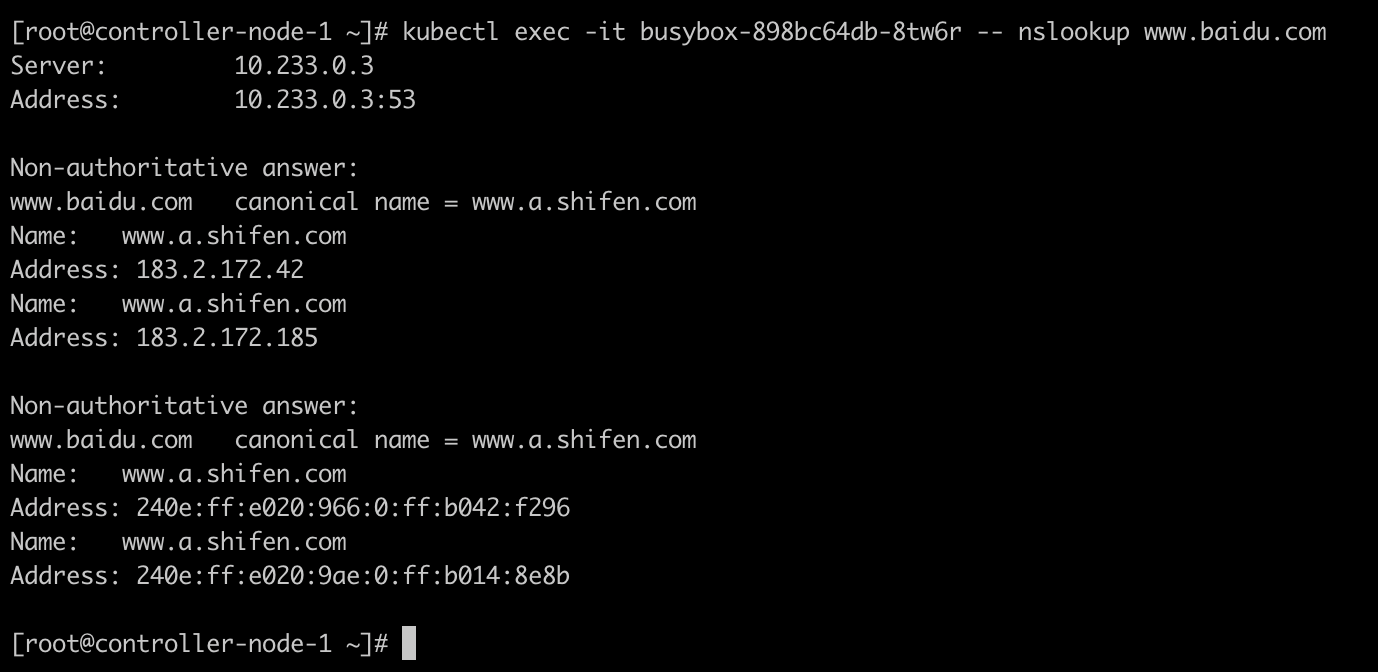
通过这个 busybox 解析集群外部域名:

可以看到,对 www.baidu.com 的解析结果是通过上游 DNS 服务器 192.168.0.5 获取到的。

请求路径如下:

1
Pod -> CoreDNS -> 192.168.0.5 -> CoreDNS -> Pod
1
2
3
4
5
6
7
8
9
10
11
12
13
14
15
16
17
18
19
20
21
22
23
24
25
26
[root@controller-node-1 ~]# tcpdump -i any -nnvvv 'port 53 and ((host 10.233.74.83 and host 10.233.0.3) or host 192.168.0.5)'
tcpdump: listening on any, link-type LINUX_SLL (Linux cooked), capture size 262144 bytes
22:58:29.405332 IP (tos 0x0, ttl 64, id 48447, offset 0, flags [DF], proto UDP (17), length 59)
10.233.74.83.38430 > 10.233.0.3.53: [bad udp cksum 0x6060 -> 0xdcc6!] 28765+ A? www.baidu.com. (31)
22:58:29.405423 IP (tos 0x0, ttl 64, id 48448, offset 0, flags [DF], proto UDP (17), length 59)
10.233.74.83.38430 > 10.233.0.3.53: [bad udp cksum 0x6060 -> 0xcdcd!] 25686+ AAAA? www.baidu.com. (31)
22:58:29.405881 IP (tos 0x0, ttl 64, id 42712, offset 0, flags [DF], proto UDP (17), length 59)
10.233.74.66.56555 > 192.168.0.5.53: [bad udp cksum 0x1611 -> 0x2f90!] 1558+ AAAA? www.baidu.com. (31)
22:58:29.405950 IP (tos 0x0, ttl 63, id 42712, offset 0, flags [DF], proto UDP (17), length 59)
192.168.159.41.56555 > 192.168.0.5.53: [bad udp cksum 0x20b8 -> 0x24e9!] 1558+ AAAA? www.baidu.com. (31)
22:58:29.406110 IP (tos 0x0, ttl 64, id 42713, offset 0, flags [DF], proto UDP (17), length 59)
10.233.74.66.58403 > 192.168.0.5.53: [bad udp cksum 0x1611 -> 0xf518!] 21589+ A? www.baidu.com. (31)
22:58:29.406191 IP (tos 0x0, ttl 63, id 42713, offset 0, flags [DF], proto UDP (17), length 59)
192.168.159.41.58403 > 192.168.0.5.53: [bad udp cksum 0x20b8 -> 0xea71!] 21589+ A? www.baidu.com. (31)
22:58:29.410592 IP (tos 0x0, ttl 63, id 39983, offset 0, flags [DF], proto UDP (17), length 118)
192.168.0.5.53 > 192.168.159.41.58403: [udp sum ok] 21589 q: A? www.baidu.com. 3/0/0 www.baidu.com. [2m9s] CNAME www.a.shifen.com., www.a.shifen.com. [2m9s] A 183.2.172.185, www.a.shifen.com. [2m9s] A 183.2.172.42 (90)
22:58:29.410637 IP (tos 0x0, ttl 62, id 39983, offset 0, flags [DF], proto UDP (17), length 118)
192.168.0.5.53 > 10.233.74.66.58403: [udp sum ok] 21589 q: A? www.baidu.com. 3/0/0 www.baidu.com. [2m9s] CNAME www.a.shifen.com., www.a.shifen.com. [2m9s] A 183.2.172.185, www.a.shifen.com. [2m9s] A 183.2.172.42 (90)
22:58:29.410972 IP (tos 0x0, ttl 63, id 64831, offset 0, flags [DF], proto UDP (17), length 166)
10.233.0.3.53 > 10.233.74.83.38430: [bad udp cksum 0x60cb -> 0xe43e!] 28765 q: A? www.baidu.com. 3/0/0 www.baidu.com. [30s] CNAME www.a.shifen.com., www.a.shifen.com. [30s] A 183.2.172.42, www.a.shifen.com. [30s] A 183.2.172.185 (138)
22:58:29.413159 IP (tos 0x0, ttl 63, id 39984, offset 0, flags [DF], proto UDP (17), length 142)
192.168.0.5.53 > 192.168.159.41.56555: [udp sum ok] 1558 q: AAAA? www.baidu.com. 3/0/0 www.baidu.com. [3m29s] CNAME www.a.shifen.com., www.a.shifen.com. [3m29s] AAAA 240e:ff:e020:9ae:0:ff:b014:8e8b, www.a.shifen.com. [3m29s] AAAA 240e:ff:e020:966:0:ff:b042:f296 (114)
22:58:29.413203 IP (tos 0x0, ttl 62, id 39984, offset 0, flags [DF], proto UDP (17), length 142)
192.168.0.5.53 > 10.233.74.66.56555: [udp sum ok] 1558 q: AAAA? www.baidu.com. 3/0/0 www.baidu.com. [3m29s] CNAME www.a.shifen.com., www.a.shifen.com. [3m29s] AAAA 240e:ff:e020:9ae:0:ff:b014:8e8b, www.a.shifen.com. [3m29s] AAAA 240e:ff:e020:966:0:ff:b042:f296 (114)
22:58:29.413922 IP (tos 0x0, ttl 63, id 64833, offset 0, flags [DF], proto UDP (17), length 190)
10.233.0.3.53 > 10.233.74.83.38430: [bad udp cksum 0x60e3 -> 0x9ac9!] 25686 q: AAAA? www.baidu.com. 3/0/0 www.baidu.com. [30s] CNAME www.a.shifen.com., www.a.shifen.com. [30s] AAAA 240e:ff:e020:966:0:ff:b042:f296, www.a.shifen.com. [30s] AAAA 240e:ff:e020:9ae:0:ff:b014:8e8b (162)

NodeLocalDNS

NodeLocal DNSCache 通过在每个节点上以 DaemonSet 的方式运行 DNS 缓存代理,提升集群 DNS 查询性能。

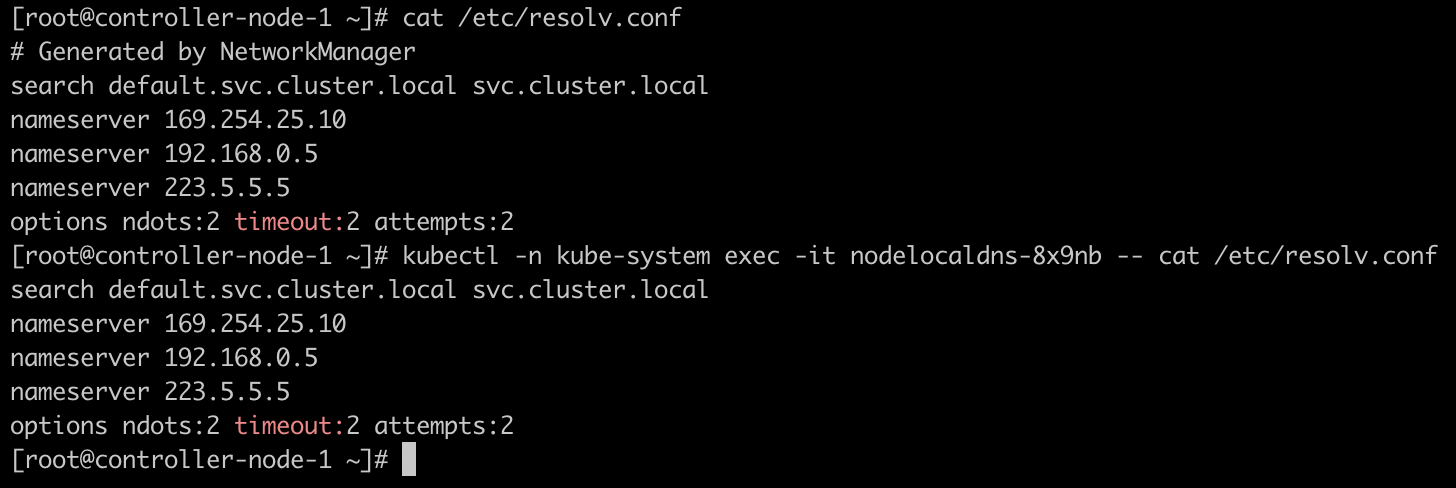
NodeLocalDNS Pod 中的 /etc/resolv.conf 与宿主机是相同的:

节点上也会有对应的本地监听地址,这个地址取决于 NodeLocalDNS 的启动参数:
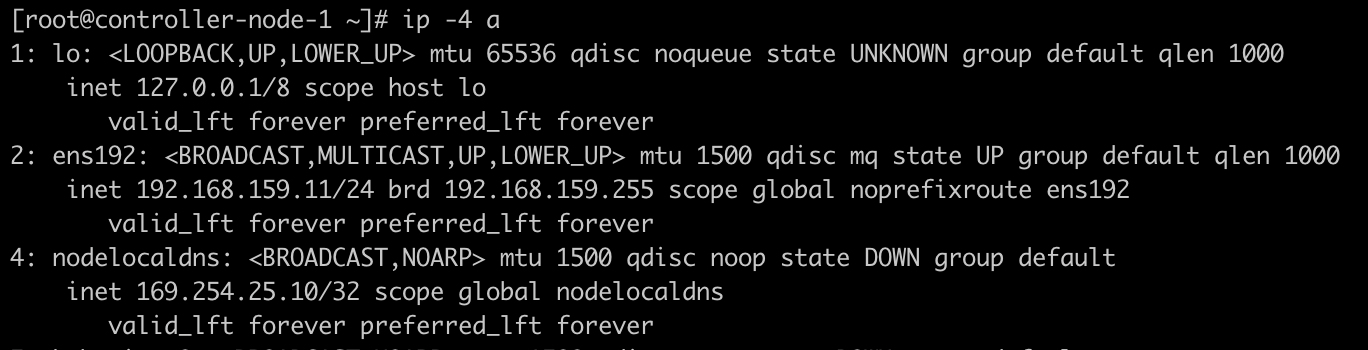
在集群启用 NodeLocalDNS 的情况下,Pod 中的 /etc/resolv.conf 会将 nameserver 指向 NodeLocalDNS 的本地监听地址,例如:

1
nameserver 169.254.25.10

解析集群内部域名

对集群内部域名进行解析时,DNS 请求会先发送到 NodeLocalDNS。

如果 NodeLocalDNS 已经缓存了该记录,请求路径如下:

1
Pod -> NodeLocalDNS -> Pod

如果 NodeLocalDNS 没有缓存该记录,NodeLocalDNS 会继续向 CoreDNS 查询,请求路径如下:

1
Pod -> NodeLocalDNS -> CoreDNS -> NodeLocalDNS -> Pod

下面的抓包结果显示,Pod 向 NodeLocalDNS 发起查询,随后 NodeLocalDNS 直接返回了结果。

1
2
3
4
5
6
7
8
9
10
[root@controller-node-1 ~]# tcpdump -i any -nnvvv 'port 53 and ((host 10.233.74.83 and host 169.254.25.10) or host 10.233.0.3)'
tcpdump: listening on any, link-type LINUX_SLL (Linux cooked), capture size 262144 bytes
23:19:46.273718 IP (tos 0x0, ttl 64, id 61227, offset 0, flags [DF], proto UDP (17), length 82)
10.233.74.83.36711 > 169.254.25.10.53: [bad udp cksum 0x1894 -> 0x3f9b!] 22032+ A? kubernetes.default.svc.cluster.local. (54)
23:19:46.273793 IP (tos 0x0, ttl 64, id 61228, offset 0, flags [DF], proto UDP (17), length 82)
10.233.74.83.36711 > 169.254.25.10.53: [bad udp cksum 0x1894 -> 0xb26b!] 58148+ AAAA? kubernetes.default.svc.cluster.local. (54)
23:19:46.275678 IP (tos 0x0, ttl 64, id 60479, offset 0, flags [DF], proto UDP (17), length 134)
169.254.25.10.53 > 10.233.74.83.36711: [bad udp cksum 0x18c8 -> 0xef59!] 22032*- q: A? kubernetes.default.svc.cluster.local. 1/0/0 kubernetes.default.svc.cluster.local. [5s] A 10.233.0.1 (106)
23:19:46.275946 IP (tos 0x0, ttl 64, id 60480, offset 0, flags [DF], proto UDP (17), length 175)
169.254.25.10.53 > 10.233.74.83.36711: [bad udp cksum 0x18f1 -> 0x5d58!] 58148*- q: AAAA? kubernetes.default.svc.cluster.local. 0/1/0 ns: cluster.local. [5s] SOA ns.dns.cluster.local. hostmaster.cluster.local. 1711802462 7200 1800 86400 5 (147)

解析集群外部域名

对于集群外部域名,NodeLocalDNS 的行为取决于其 Corefile 配置。

常见配置下:

  • cluster.local 这类集群内部域名会由 NodeLocalDNS 转发到 CoreDNS。
  • 非集群内部域名会由 NodeLocalDNS 转发到上游 DNS 服务器,不一定再次经过 CoreDNS。

在当前环境中,从抓包结果可以看到,www.google.com 的查询由 NodeLocalDNS 转发到了上游 DNS 服务器 192.168.0.5,并没有经过 CoreDNS。

请求路径如下:

1
Pod -> NodeLocalDNS -> 192.168.0.5 -> NodeLocalDNS -> Pod
1
2
3
4
5
6
7
8
9
10
11
12
13
14
15
16
17
[root@controller-node-1 ~]# tcpdump -i any -nnvvv 'port 53 and ((host 10.233.74.83 and host 169.254.25.10) or host 192.168.0.5 or host 10.233.0.3)'
23:27:25.569362 IP (tos 0x0, ttl 64, id 36019, offset 0, flags [DF], proto UDP (17), length 60)
10.233.74.83.42419 > 169.254.25.10.53: [bad udp cksum 0x187e -> 0x94cd!] 7676+ A? www.google.com. (32)
23:27:25.569423 IP (tos 0x0, ttl 64, id 36020, offset 0, flags [DF], proto UDP (17), length 60)
10.233.74.83.42419 > 169.254.25.10.53: [bad udp cksum 0x187e -> 0xb5c9!] 64740+ AAAA? www.google.com. (32)
23:27:25.569823 IP (tos 0x0, ttl 64, id 65347, offset 0, flags [DF], proto UDP (17), length 71)
192.168.159.11.57457 > 192.168.0.5.53: [bad udp cksum 0x20a6 -> 0x7971!] 52418+ [1au] AAAA? www.google.com. ar: . OPT UDPsize=2048 DO (43)
23:27:25.569841 IP (tos 0x0, ttl 64, id 65348, offset 0, flags [DF], proto UDP (17), length 71)
192.168.159.11.33304 > 192.168.0.5.53: [bad udp cksum 0x20a6 -> 0xa430!] 120+ [1au] A? www.google.com. ar: . OPT UDPsize=2048 DO (43)
23:27:25.571423 IP (tos 0x0, ttl 63, id 18081, offset 0, flags [DF], proto UDP (17), length 152)
192.168.0.5.53 > 192.168.159.11.57457: [udp sum ok] 52418 q: AAAA? www.google.com. 0/1/1 ns: www.google.com. [10s] SOA fake-for-negative-caching.adguard.com. hostmaster.www.google.com. 100500 1800 60 604800 86400 ar: . OPT UDPsize=2048 DO (124)
23:27:25.571763 IP (tos 0x0, ttl 64, id 40563, offset 0, flags [DF], proto UDP (17), length 172)
169.254.25.10.53 > 10.233.74.83.42419: [bad udp cksum 0x18ee -> 0x3576!] 64740 q: AAAA? www.google.com. 0/1/0 ns: www.google.com. [10s] SOA fake-for-negative-caching.adguard.com. hostmaster.www.google.com. 100500 1800 60 604800 86400 (144)
23:27:25.573701 IP (tos 0x0, ttl 63, id 18082, offset 0, flags [DF], proto UDP (17), length 87)
192.168.0.5.53 > 192.168.159.11.33304: [udp sum ok] 120 q: A? www.google.com. 1/0/1 www.google.com. [1m30s] A 216.58.203.68 ar: . OPT UDPsize=2048 DO (59)
23:27:25.573927 IP (tos 0x0, ttl 64, id 40564, offset 0, flags [DF], proto UDP (17), length 90)
169.254.25.10.53 > 10.233.74.83.42419: [bad udp cksum 0x189c -> 0xe2c7!] 7676 q: A? www.google.com. 1/0/0 www.google.com. [30s] A 216.58.203.68 (62)

总结

未启用 NodeLocalDNS 时,Pod 会直接把 DNS 查询请求发送到 CoreDNS。

1
Pod -> CoreDNS

启用 NodeLocalDNS 后,Pod 会优先把 DNS 查询请求发送到节点本地的 NodeLocalDNS。

1
Pod -> NodeLocalDNS

对于集群内部域名:

1
Pod -> NodeLocalDNS -> CoreDNS

如果 NodeLocalDNS 已经缓存了记录,则可以直接返回:

1
Pod -> NodeLocalDNS -> Pod

对于集群外部域名,NodeLocalDNS 是否经过 CoreDNS 取决于 NodeLocalDNS 的 Corefile 配置。在当前环境中,外部域名由 NodeLocalDNS 直接转发到上游 DNS 服务器。

1
Pod -> NodeLocalDNS -> 上游 DNS
Author

Warner Chen

Posted on

2024-03-30

Updated on

2026-06-18

Licensed under

You need to set install_url to use ShareThis. Please set it in _config.yml.
You forgot to set the business or currency_code for Paypal. Please set it in _config.yml.

Comments

You forgot to set the shortname for Disqus. Please set it in _config.yml.
You need to set client_id and slot_id to show this AD unit. Please set it in _config.yml.