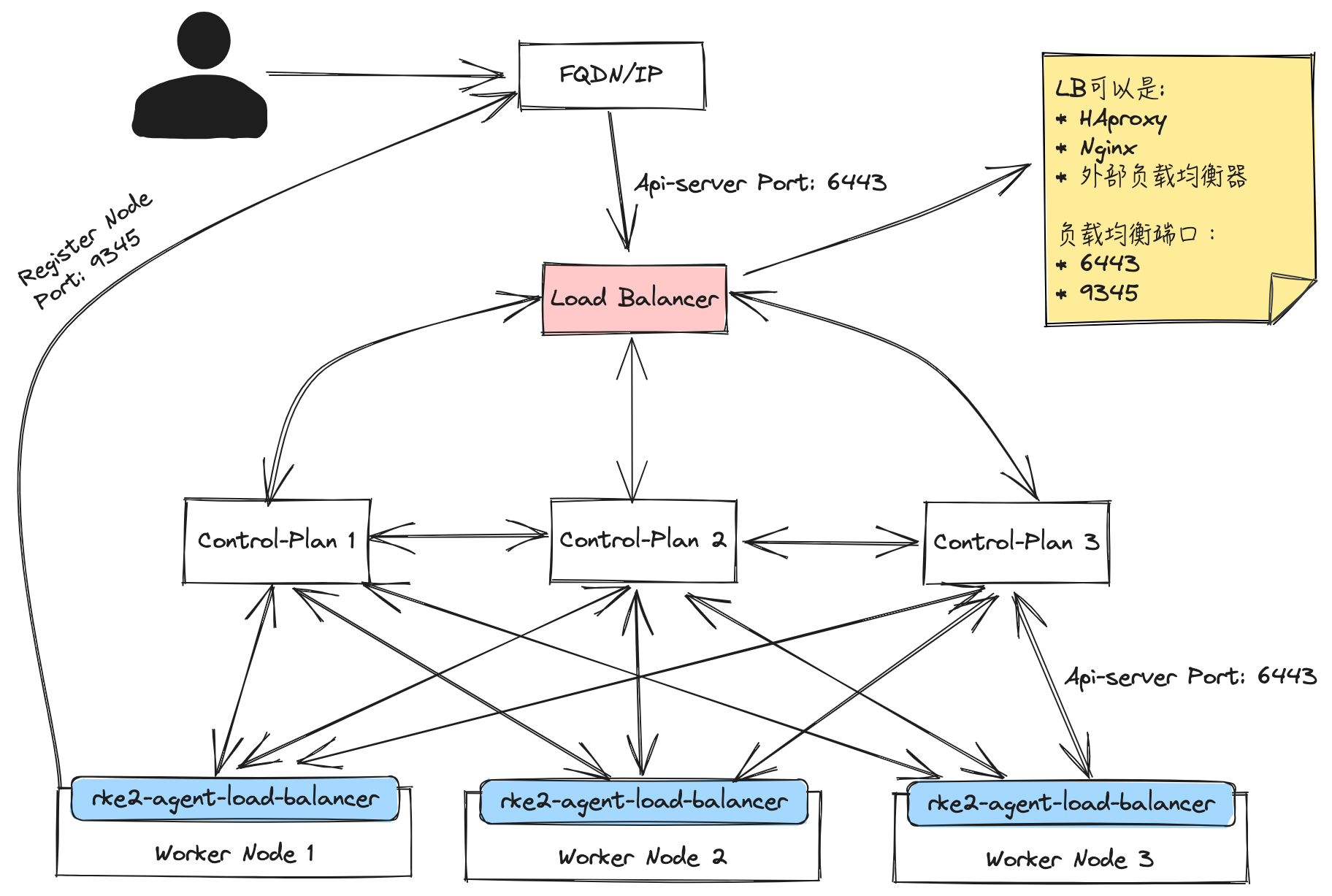
在 RKE2 高可用部署中,需要在多个 Server 节点前提供一个固定的访问入口,作为节点注册和 Kubernetes API 访问地址。
RKE2 Server 默认监听以下端口:
9345:RKE2 Supervisor 端口,用于新节点注册和集群内部通信6443:Kubernetes API Server 端口,用于 Kubernetes API 访问
因此,负载均衡器需要同时转发 9345 和 6443 两个端口。建议使用 Layer 4 TCP Load Balancer、DNS 或 VIP 作为固定入口,并在 RKE2 配置中通过 tls-san 添加 LB 的 IP 或域名,避免通过 LB 访问时出现证书校验错误。
参考文档:https://ee.docs.rancher.cn/docs/installation/kubernetes-cluster-setup/high-availability%20/rke2-ha-install-for-nginx
部署架构示意图:
部署 Nginx TCP Load Balancer
本文使用 Nginx Stream 模块作为四层 TCP 负载均衡器,将 6443 和 9345 分别转发到后端 RKE2 Server 节点。
准备 Nginx 配置文件
1
2
3
4
5
6
7
8
9
10
11
12
13
14
15
16
17
18
19
20
21
22
23
24
25
26
27
28
29
30
31
32
33
34
35
36
37
38
39
40
41
42
43
| cat <<EOF > nginx.conf
worker_processes 1;
events {
worker_connections 8192;
}
stream {
log_format proxy '$remote_addr [$time_local] '
'$protocol $status $bytes_sent $bytes_received '
'$session_time "$upstream_addr"';
upstream kube_apiservers {
server 172.16.16.140:6443 max_fails=5 fail_timeout=8s;
server 172.16.16.141:6443 max_fails=5 fail_timeout=8s;
server 172.16.16.147:6443 max_fails=5 fail_timeout=8s;
}
upstream rke2_supervisors {
server 172.16.16.140:9345 max_fails=5 fail_timeout=8s;
server 172.16.16.141:9345 max_fails=5 fail_timeout=8s;
server 172.16.16.147:9345 max_fails=5 fail_timeout=8s;
}
server {
listen 6443;
proxy_pass kube_apiservers;
proxy_connect_timeout 5s;
proxy_timeout 300s;
access_log /dev/stdout proxy;
error_log /dev/stderr info;
}
server {
listen 9345;
proxy_pass rke2_supervisors;
proxy_connect_timeout 5s;
proxy_timeout 300s;
access_log /dev/stdout proxy;
error_log /dev/stderr info;
}
}
EOF
|
启动 Nginx
1
2
3
4
5
6
7
| docker run -d \
--name nginx \
--restart=always \
-v $(pwd)/nginx.conf:/etc/nginx/nginx.conf \
-p 6443:6443 \
-p 9345:9345 \
harbor.warnerchen.com/library/nginx:mainline
|
部署 RKE2
配置第一台 Server 节点
在第一台 RKE2 Server 节点上准备配置文件。
需要在 tls-san 中添加 Nginx LB 的 IP 或域名,确保通过 LB 访问 Kubernetes API Server 时证书校验正常。
1
2
3
4
5
6
7
8
| mkdir -pv /etc/rancher/rke2
cat <<EOF > /etc/rancher/rke2/config.yaml
token: my-shared-secret
tls-san:
- 172.16.16.142
system-default-registry: harbor.warnerchen.com
EOF
|
启动第一台 Server 节点:
1
2
3
4
5
|
curl -sfL https://get.rke2.io | sh -
systemctl enable rke2-server --now
|
配置剩余 Server 节点
在剩余 RKE2 Server 节点上准备配置文件。
其中 server 需要指向前面准备的 Nginx LB 地址和 9345 端口:
1
2
3
4
5
6
7
8
9
| mkdir -pv /etc/rancher/rke2
cat <<EOF > /etc/rancher/rke2/config.yaml
server: https://172.16.16.142:9345
token: my-shared-secret
tls-san:
- 172.16.16.142
system-default-registry: harbor.warnerchen.com
EOF
|
启动剩余 Server 节点:
1
2
3
4
5
|
curl -sfL https://get.rke2.io | sh -
systemctl enable rke2-server --now
|
为 Nginx 配置 HTTPS
注意:该方式仅用于实验性测试,生产环境不建议这样配置。
RKE2 的 6443 和 9345 本身已经是 HTTPS 服务。通常建议在 Nginx 上使用 TCP Passthrough,而不是在 Nginx 上做 TLS 终止。
如果希望在 Nginx 上配置 HTTPS 终止,需要特别注意证书来源。
由于后端 Kubernetes API Server 本身启用了 HTTPS,如果 Nginx 使用自定义 CA 签发的证书进行 TLS 终止,可能导致客户端认证或证书链不匹配等问题。为了避免此类问题,可以使用 RKE2 生成的 Server CA 签发 Nginx 使用的证书。
RKE2 Server CA 文件通常位于:
1
2
| /var/lib/rancher/rke2/server/tls/server-ca.crt
/var/lib/rancher/rke2/server/tls/server-ca.key
|
生成 Nginx 使用的证书
准备 OpenSSL 配置文件:
1
2
3
4
5
6
7
8
9
10
11
12
13
14
15
16
17
18
19
20
21
22
23
24
25
26
| cat <<EOF > openssl.cnf
[ req ]
default_bits = 2048
default_keyfile = privkey.pem
distinguished_name = req_distinguished_name
req_extensions = v3_req
[ req_distinguished_name ]
countryName = Country Name (2 letter code)
countryName_default = CN
stateOrProvinceName = State or Province Name (full name)
stateOrProvinceName_default = Guangdong
localityName = Locality Name (eg, city)
localityName_default = Shenzhen
organizationName = Organization Name (eg, company)
organizationName_default = SUSE
commonName = Common Name (eg, fully qualified host name)
commonName_default = rke2-test.warnerchen.com
[ v3_req ]
subjectAltName = @alt_names
[ alt_names ]
DNS.1 = rke2-test.warnerchen.com
IP.1 = 172.16.16.142
EOF
|
生成 CSR:
1
2
3
4
| openssl req -new \
-key /var/lib/rancher/rke2/server/tls/server-ca.key \
-out server.csr \
-config openssl.cnf
|
使用 RKE2 Server CA 签发证书:
1
2
3
4
5
6
7
8
9
| openssl x509 -req \
-in server.csr \
-CA /var/lib/rancher/rke2/server/tls/server-ca.crt \
-CAkey /var/lib/rancher/rke2/server/tls/server-ca.key \
-CAcreateserial \
-out server.crt \
-days 365 \
-extensions v3_req \
-extfile openssl.cnf
|
配置 Nginx HTTPS 代理
准备 Nginx 配置文件:
1
2
3
4
5
6
7
8
9
10
11
12
13
14
15
16
17
18
19
20
21
22
23
24
25
26
27
28
29
30
31
32
33
34
35
36
37
38
39
40
41
42
43
44
45
46
47
48
49
50
51
52
53
54
55
56
57
58
59
60
61
62
63
| cat <<EOF > nginx.conf
worker_processes 1;
events {
worker_connections 1024;
}
http {
upstream kube_apiservers {
server 172.16.16.140:6443 max_fails=5 fail_timeout=8s;
server 172.16.16.141:6443 max_fails=5 fail_timeout=8s;
server 172.16.16.147:6443 max_fails=5 fail_timeout=8s;
}
upstream rke2_supervisors {
server 172.16.16.140:9345 max_fails=5 fail_timeout=8s;
server 172.16.16.141:9345 max_fails=5 fail_timeout=8s;
server 172.16.16.147:9345 max_fails=5 fail_timeout=8s;
}
server {
listen 6443 ssl;
server_name rke2-test.warnerchen.com;
ssl_certificate /etc/nginx/certs/server.crt;
ssl_certificate_key /etc/nginx/certs/server.key;
location / {
proxy_pass https://kube_apiservers;
proxy_ssl_verify off;
proxy_set_header Host \$host;
proxy_set_header X-Real-IP \$remote_addr;
proxy_set_header X-Forwarded-For \$proxy_add_x_forwarded_for;
proxy_read_timeout 300s;
proxy_connect_timeout 60s;
proxy_send_timeout 300s;
}
}
server {
listen 9345 ssl;
server_name rke2-test.warnerchen.com;
ssl_certificate /etc/nginx/certs/server.crt;
ssl_certificate_key /etc/nginx/certs/server.key;
location / {
proxy_pass https://rke2_supervisors;
proxy_ssl_verify off;
proxy_set_header Host \$host;
proxy_set_header X-Real-IP \$remote_addr;
proxy_set_header X-Forwarded-For \$proxy_add_x_forwarded_for;
proxy_read_timeout 300s;
proxy_connect_timeout 60s;
proxy_send_timeout 300s;
}
}
}
EOF
|
注意:示例中 ssl_certificate_key 需要使用与 server.crt 匹配的私钥文件。请根据实际证书生成方式确认私钥路径和文件名。
启动 Nginx:
1
2
3
4
5
6
7
8
| docker run -d \
--name nginx \
--restart=always \
-v $(pwd)/nginx.conf:/etc/nginx/nginx.conf \
-v $(pwd)/certs:/etc/nginx/certs \
-p 6443:6443 \
-p 9345:9345 \
harbor.warnerchen.com/library/nginx:mainline
|