fake-gpu-operator 可以在 CPU 节点上模拟 nvidia.com/gpu 资源。在没有真实 GPU 的情况下,可以用于了解 HAMi 组件组成,并验证 GPU Pod 的调度流程。
参考资料:https://project-hami.io/zh/tutorials/labs/local-fake-gpu
前提条件
RKE2 版本 >= 1.18
集群已安装 Prometheus
1
2
3
4
5
6
7
root@test-0:~# kubectl get nodes NAME STATUS ROLES AGE VERSION test-0 Ready control-plane,etcd,worker 55m v1.34.7+rke2r1 root@test-0:~# kubectl -n cattle-monitoring-system get pod | grep prometheus prometheus-rancher-monitoring-prometheus-0 3/3 Running 0 46m ...
安装 fake-gpu-operator 1 2 3 4 5 6 7 8 9 10 kubectl create namespace gpu-operator kubectl label namespace gpu-operator pod-security.kubernetes.io/enforce=privileged kubectl label node test-0 run.ai/simulated-gpu-node-pool=default export FAKE_GPU_OPERATOR_VERSION=0.0.82helm -n gpu-operator upgrade --install gpu-operator \ oci://ghcr.io/run-ai/fake-gpu-operator/fake-gpu-operator \ --set runtimeClass.enabled=false \ --create-namespace \ --version ${FAKE_GPU_OPERATOR_VERSION}
RKE2 默认会包含 NVIDIA 相关的 RuntimeClass,因此这里需要通过 --set runtimeClass.enabled=false 禁用 fake-gpu-operator 创建 RuntimeClass。
确认 Pod 状态:
1 2 3 4 5 6 7 8 root@test-0:~# kubectl -n gpu-operator get pod NAME READY STATUS RESTARTS AGE device-plugin-wn65m 1/1 Running 0 52m kwok-gpu-device-plugin-57bc9bf948-bsk7j 1/1 Running 0 53m nvidia-dcgm-exporter-9ct5k 1/1 Running 0 52m nvidia-dcgm-exporter-kwok-6768c648d7-7z7hj 1/1 Running 0 53m status-updater-675ffc785b-dr2n2 1/1 Running 0 53m topology-server-5cf5b5c9f6-gzxml 1/1 Running 0 53m
创建 ServiceMonitor 采集 GPU 指标 1 2 3 4 5 6 7 8 9 10 11 12 13 14 15 16 17 18 19 20 cat <<EOF | kubectl apply -f - apiVersion: monitoring.coreos.com/v1 kind: ServiceMonitor metadata: name: nvidia-dcgm-exporter namespace: gpu-operator labels: release: prometheus spec: selector: matchLabels: app: nvidia-dcgm-exporter namespaceSelector: matchNames: - gpu-operator endpoints: - port: gpu-metrics path: /metrics interval: 15s EOF
验证指标是否采集成功:
1 2 3 root@test-0:~# kubectl exec -n cattle-monitoring-system prometheus-rancher-monitoring-prometheus-0 -- promtool query instant http://localhost:9090 'DCGM_FI_DEV_GPU_UTIL' DCGM_FI_DEV_GPU_UTIL{Hostname="nvidia-dcgm-exporter-b99360" , UUID="GPU-2a850fce-4a64-5e0b-8f6e-d3747c3e7c62" , container="nvidia-dcgm-exporter" , device="nvidia1" , endpoint="gpu-metrics" , gpu="1" , instance="10.42.144.158:9400" , job="nvidia-dcgm-exporter" , modelName="Tesla-K80" , namespace="gpu-operator" , pod="nvidia-dcgm-exporter-9ct5k" , service="nvidia-dcgm-exporter" } => 0 @[1781149563.009] DCGM_FI_DEV_GPU_UTIL{Hostname="nvidia-dcgm-exporter-b99360" , UUID="GPU-45f17b1d-8533-5ec8-aa93-6138df68b8b4" , container="nvidia-dcgm-exporter" , device="nvidia0" , endpoint="gpu-metrics" , exported_container="app" , exported_namespace="default" , exported_pod="fake-gpu-pod" , gpu="0" , instance="10.42.144.158:9400" , job="nvidia-dcgm-exporter" , modelName="Tesla-K80" , namespace="gpu-operator" , pod="nvidia-dcgm-exporter-9ct5k" , service="nvidia-dcgm-exporter" } => 28 @[1781149563.009]
安装 HAMi 与 HAMi WebUI 由于 Rancher Prime GC 支持的 HAMi 版本暂不支持 devicePlugin.enabled 参数,因此这里使用官方 Helm Chart 进行安装:
1 2 3 4 5 6 helm repo add hami-charts https://project-hami.github.io/HAMi/ helm repo update helm -n hami upgrade --install hami hami-charts/hami \ --set devicePlugin.enabled=false \ --create-namespace
fake-gpu-operator 已经安装了 device-plugin,因此这里需要禁用 HAMi 的 devicePlugin。
安装 HAMi WebUI:
1 2 3 4 5 6 7 8 helm repo add hami-webui https://Project-HAMi.github.io/HAMi-WebUI/ helm repo update helm -n hami upgrade --install hami-webui hami-webui/hami-webui \ --set externalPrometheus.enabled=true \ --set externalPrometheus.address="http://rancher-monitoring-prometheus.cattle-monitoring-system.svc.cluster.local:9090" \ --set dcgm-exporter.enabled=false \ --set service.type=NodePort
确认安装状态:
1 2 3 4 5 6 7 8 9 root@test-0:~# helm -n hami ls NAME NAMESPACE REVISION UPDATED STATUS CHART APP VERSION hami hami 1 2026-06-11 10:45:04.046737106 +0800 CST deployed hami-2.9.0 2.9.0 hami-webui hami 2 2026-06-11 10:51:59.786933364 +0800 CST deployed hami-webui-1.2.0 1.2.0 root@test-0:~# kubectl -n hami get pod NAME READY STATUS RESTARTS AGE hami-scheduler-799c59bc8d-pmswt 2/2 Running 2 (58m ago) 58m hami-webui-7b57fc4cbf-hdvqd 2/2 Running 0 41m
配置节点标签和 GPU 注册信息 HAMi WebUI 通过节点标签 gpu=on 发现 GPU 节点,因此需要手动为节点添加标签:
1 kubectl label node test-0 gpu=on
在真实环境中,HAMi device-plugin 组件会自动在节点上写入 hami.io/node-nvidia-register Annotation,其中包含 GPU UUID、型号、显存等信息。
由于本次测试中禁用了 HAMi device-plugin(避免与 fake-gpu-operator 冲突),因此需要手动添加该 Annotation:
1
2
3
4
5
6
7
8
9
10
kubectl annotate node test-0 \ hami.io/node-nvidia-register='[{"id":"GPU-3cef3724-8228-5a66-b391-b0901788f5d0","count":10,"devmem":11441,"devcore":100,"type":"NVIDIA-Tesla-K80","mode":"hami-core","health":true},{"id":"GPU-5127182e-f297-5a25-bb44-0444c3be540c","index":1,"count":10,"devmem":11441,"devcore":100,"type":"NVIDIA-Tesla-K80","mode":"hami-core","health":true}]' \ hami.io/node-handshake="Requesting_$(date '+%Y.%m.%d %H:%M:%S') "
运行模拟 GPU 工作负载 通过以下 Pod 验证 Kubernetes 是否可以将申请 nvidia.com/gpu 的工作负载调度到 fake GPU 节点。
fake-gpu-operator 会为 GPU Pod 注入模拟的 nvidia-smi 工具,便于观察 GPU 可见性。
由于本实验未启用 HAMi device-plugin,HAMi 不会写入真实环境中的 hami.io/node-nvidia-register 节点注册信息。因此,测试 Pod 会显式绕过 HAMi Webhook,使用 Kubernetes 默认调度器以及 fake-gpu-operator 提供的模拟 GPU 资源。
1 2 3 4 5 6 7 8 9 10 11 12 13 14 15 16 17 18 19 20 21 22 23 24 25 26 27 28 29 cat <<EOF | kubectl apply -f - apiVersion: v1 kind: Pod metadata: name: fake-gpu-pod labels: hami.io/webhook: ignore annotations: run.ai/simulated-gpu-utilization: "10-30" spec: restartPolicy: Never containers: - name: app image: ubuntu:22.04 command: [ "bash", "-lc", "sleep 3600" ] resources: requests: cpu: "100m" memory: "128Mi" limits: cpu: "500m" memory: "512Mi" nvidia.com/gpu: 1 env: - name: NODE_NAME valueFrom: fieldRef: fieldPath: spec.nodeName EOF
查看模拟 GPU Pod 状态:
1 2 3 root@test-0:~# kubectl get pod -o wide NAME READY STATUS RESTARTS AGE IP NODE NOMINATED NODE READINESS GATES fake-gpu-pod 1/1 Running 0 37s 10.42.144.184 test-0 <none> <none>
执行 nvidia-smi 查看模拟 GPU 信息:
1 2 3 4 5 6 7 8 9 10 11 12 13 14 15 16 17 18 19 20 21 root@test-0:~# kubectl exec fake-gpu-pod -- nvidia-smi Thu Jun 11 03:49:45 2026 +------------------------------------------------------------------------------+ | NVIDIA-SMI 470.129.06 Driver Version: 470.129.06 CUDA Version: 11.4 | +--------------------------------+----------------------+----------------------+ | GPU Name Persistence-M | Bus-Id Disp.A | Volatile Uncorr. ECC | | Fan Temp Perf Pwr:Usage/Cap | Memory-Usage | GPU-Util Compute M. | | | | MIG M. | +--------------------------------+----------------------+----------------------+ | 0 Tesla-K80 Off | 00000001:00:00.0 Off | Off | | N/A 33C P8 11W / 70W | 11441MiB / 11441MiB | 29% Default | | | | N/A | +--------------------------------+----------------------+----------------------+ +------------------------------------------------------------------------------+ | Processes: | | GPU GI CI PID Type Process name GPU Memory | | ID ID Usage | +------------------------------------------------------------------------------+ | 0 N/A N/A 31 G sleep3600 11441MiB | +------------------------------------------------------------------------------+
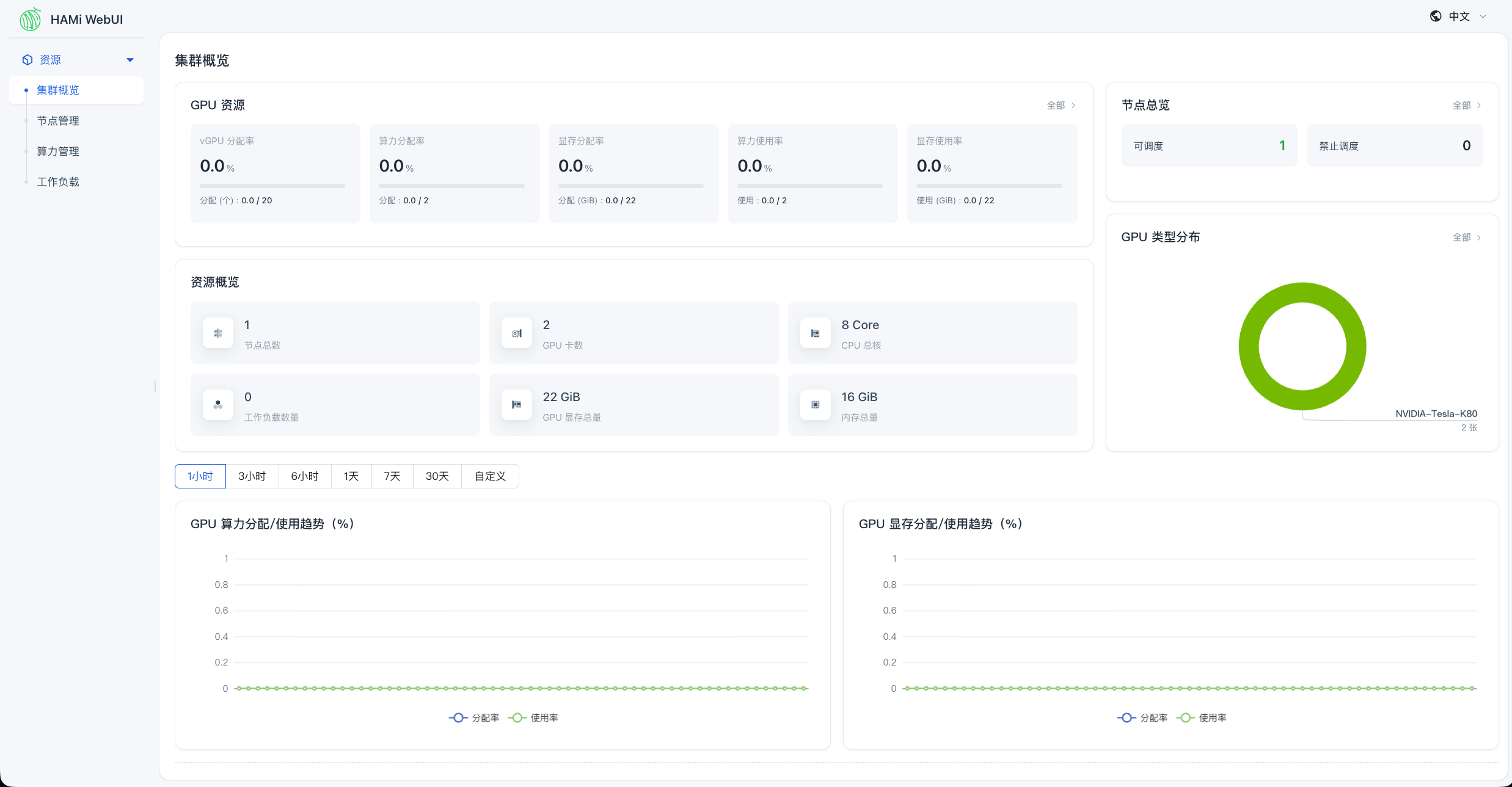
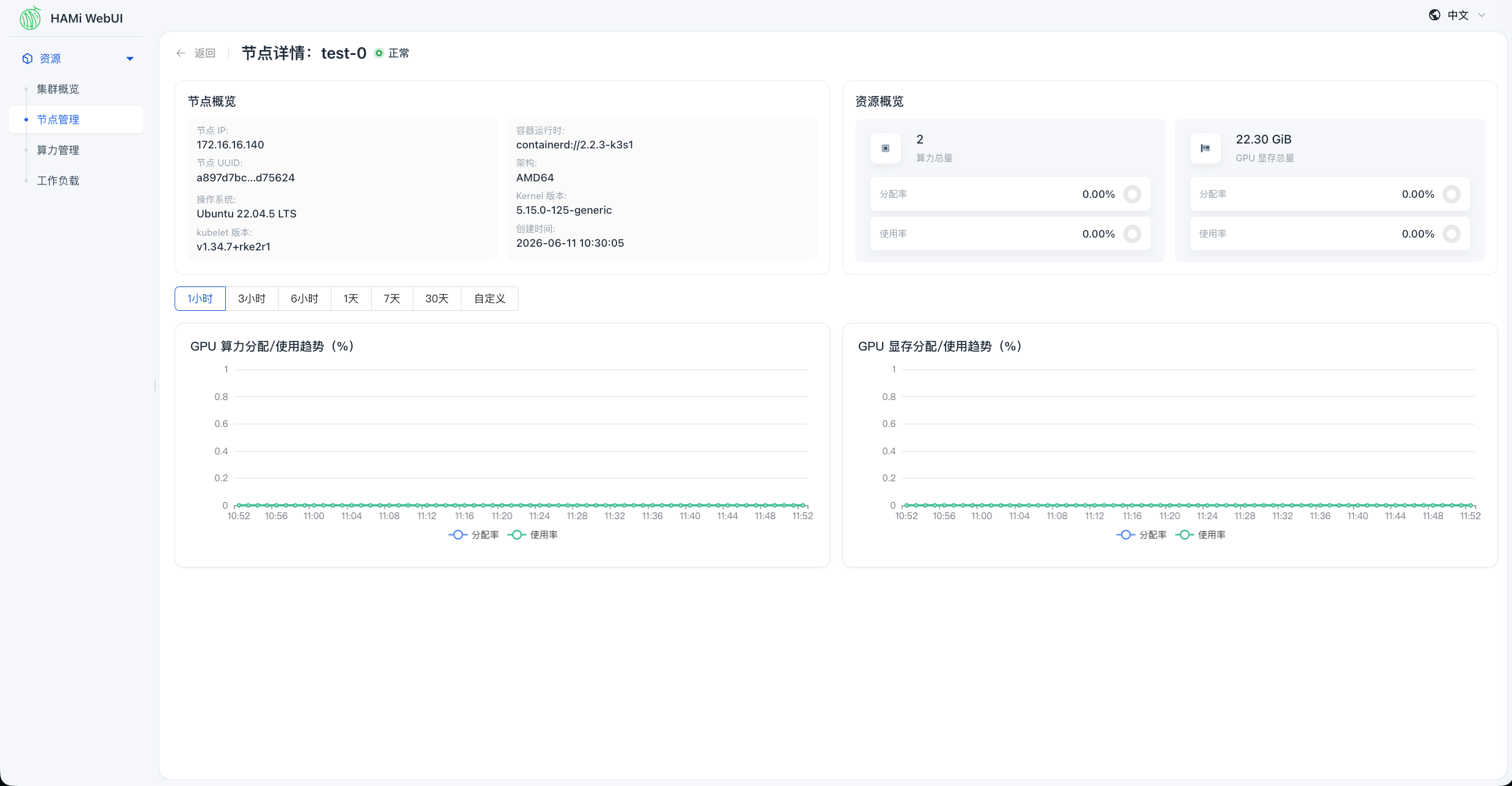
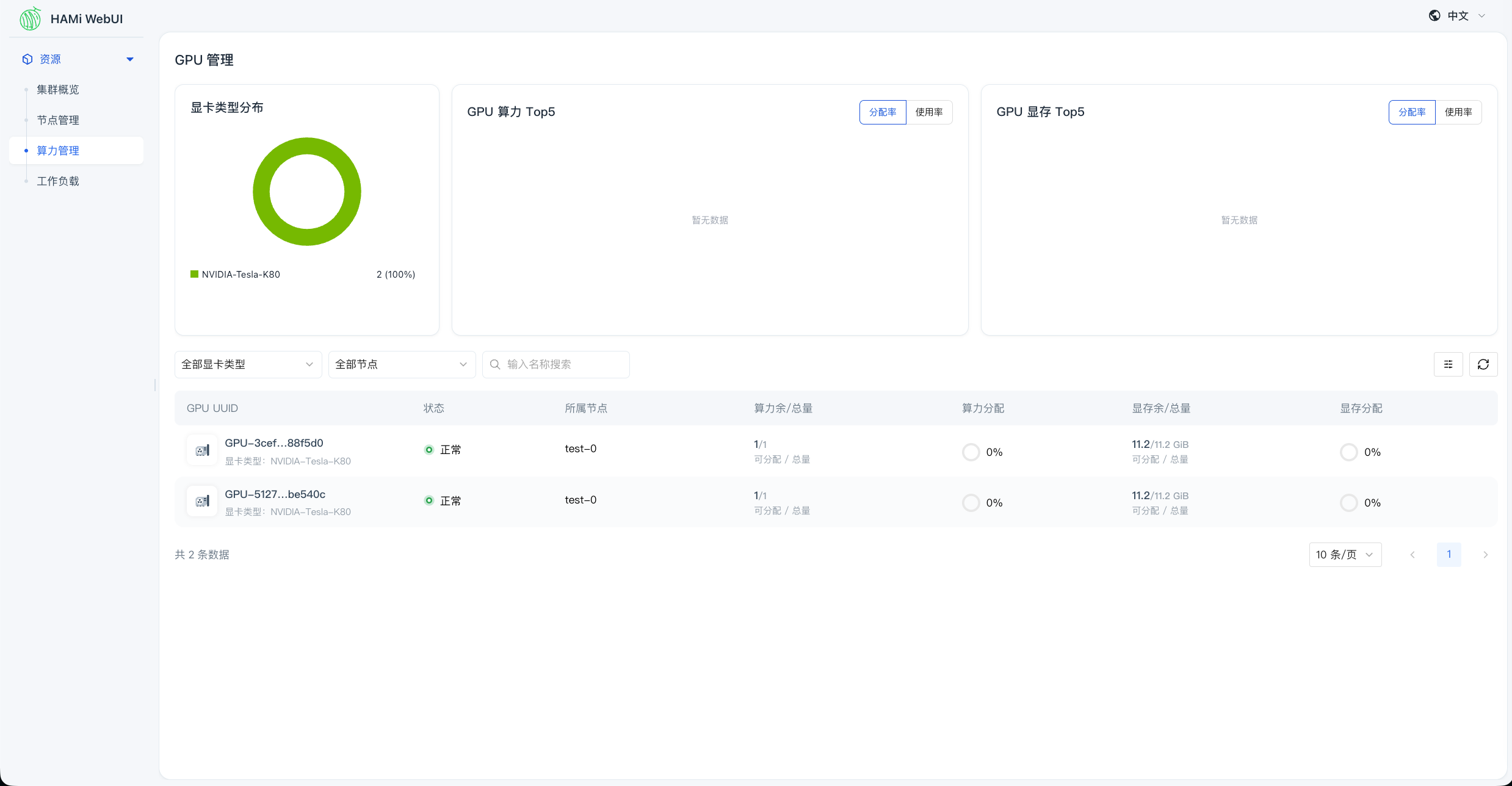
访问 HAMi WebUI 通过 NodePort 访问 HAMi WebUI,可以查看节点 GPU 信息:
限制 以下能力需要真实 NVIDIA GPU 环境:
HAMi device-plugin 自动注册真实 GPU,并写入 hami.io/node-nvidia-register
nvidia.com/gpumem 显存切分nvidia.com/gpucores 算力比例限制CUDA 程序真实运行
显存超配
显存分析
显存覆盖
DCGM 真实 GPU 指标