KServe 是一个开源的云原生模型服务平台,能够快速在 Kubernetes 上部署和运行机器学习模型,支持多种机器学习框架,并具备弹性扩容能力。
前提条件
Kubernetes 集群版本需要 v1.32+,此处使用 RKE2 v1.35.7+rke2r1
集群有 GPU 节点,且已安装 NVIDIA 内核驱动和 NVIDIA Container Toolkit,此处 GPU 使用 NVIDIA GeForce RTX 3060,12GiB 显存
集群已安装 GPU Operator
集群已安装 HAMi(可选,此处只有一张卡,需要使用 HAMi 实现 GPU 共享)
KServe 常用 CRD
InferenceService:部署和管理模型推理服务
ServingRuntime:定义 Namespace 级模型运行环境
ClusterServingRuntime:定义集群级共享 Runtime
InferenceGraph:编排多个模型和路由逻辑
TrainedModel:管理模型版本 / 多模型
ClusterStorageContainer:定义模型下载 / 存储初始化方式
KServe 部署 参考文档:https://kserve.github.io/website/docs/admin-guide/kubernetes-deployment
安装依赖项 安装 Cert Manager:
1
2
3
4
5
6
7
8
9
helm repo add jetstack https://charts.jetstack.io helm repo update helm upgrade --install \ cert-manager jetstack/cert-manager \ --namespace cert-manager \ --create-namespace \ --version v1.21.1 \ --set crds.enabled=true
KServe 需要使用 Gateway API / Ingress,此处使用 RKE2 Traefik 的 Gateway API 能力。
对于自建 RKE2 集群:
1
2
3
4
5
6
7
8
9
10
11
12
cat <<EOF | kubectl apply -f - apiVersion: helm.cattle.io/v1 kind: HelmChartConfig metadata: name: rke2-traefik namespace: kube-system spec: valuesContent: |- providers: kubernetesGateway: enabled: true EOF
对于 Rancher 创建的 RKE2 集群,可以通过 YAML 编辑集群并添加如下配置:
1
2
3
4
5
6
7
8
9
10
11
12
13
apiVersion: provisioning.cattle.io/v1 kind: Cluster metadata: ... spec: kubernetesVersion: v1.35.7+rke2r1 rkeConfig: chartValues: rke2-traefik: providers: kubernetesGateway: enabled: true ...
创建 Gateway:
1
2
3
4
5
6
7
8
9
10
11
12
13
14
15
16
17
18
19
cat <<EOF | kubectl apply -f - apiVersion: gateway.networking.k8s.io/v1 kind: Gateway metadata: name: kserve-ingress-gateway namespace: kserve spec: gatewayClassName: traefik listeners: - name: http protocol: HTTP port: 8000 allowedRoutes: namespaces: from: All infrastructure: labels: serving.kserve.io/gateway: kserve-ingress-gateway EOF
安装 KServe CRD 1 2 3 4 helm upgrade --install kserve-crd oci://ghcr.io/kserve/charts/kserve-crd \ --namespace kserve \ --create-namespace \ --version v0.20.0
安装 KServe 1 2 3 4 5 6 helm upgrade --install kserve oci://ghcr.io/kserve/charts/kserve-resources \ --namespace kserve \ --version v0.20.0 \ --set kserve.controller.deploymentMode=Standard \ --set kserve.controller.gateway.ingressGateway.enableGatewayApi=true \ --set kserve.controller.gateway.ingressGateway.kserveGateway=kserve/kserve-ingress-gateway
验证是否安装完成:
1 2 kubectl get pods -n kserve kubectl get crd | grep serving.kserve.io
准备存储 准备存放模型的数据目录,此处使用 GPU 节点的本地目录进行存储。
在 GPU 节点创建数据目录:
1 mkdir -pv /data/kserve-models
创建测试用的 Namespace、PV 和 PVC:
1 2 3 4 5 6 7 8 9 10 11 12 13 14 15 16 17 18 19 20 21 22 23 24 25 26 27 28 29 30 31 32 33 34 35 36 37 38 39 40 41 42 43 44 45 46 cat <<EOF | kubectl apply -f - apiVersion: v1 kind: Namespace metadata: name: kserve-lab --- apiVersion: v1 kind: PersistentVolume metadata: name: kserve-lab-models-gpu0 spec: capacity: storage: 20Gi volumeMode: Filesystem accessModes: - ReadWriteOnce persistentVolumeReclaimPolicy: Retain storageClassName: '' claimRef: namespace: kserve-lab name: kserve-models local: path: /data/kserve-models nodeAffinity: required: nodeSelectorTerms: - matchExpressions: - key: kubernetes.io/hostname operator: In values: - gpu-0 --- apiVersion: v1 kind: PersistentVolumeClaim metadata: name: kserve-models namespace: kserve-lab spec: accessModes: - ReadWriteOnce storageClassName: '' volumeName: kserve-lab-models-gpu0 resources: requests: storage: 20Gi EOF
模型下载 在刚刚创建好的目录中,预先下载 Qwen2.5-1.5B-Instruct 和 Qwen3-Embedding-0.6B 两个模型,用于后续测试:
1 2 3 4 5 6 7 8 9 10 11 12 13 14 15 16 17 18 19 20 21 22 23 24 25 26 27 28 29 30 31 32 33 34 35 36 37 38 39 40 41 42 43 44 45 46 47 48 49 50 51 52 53 54 55 56 57 58 59 60 61 62 63 64 65 66 67 68 69 70 71 72 73 74 75 76 77 78 79 80 81 82 83 84 85 86 87 88 89 90 91 92 93 94 95 96 97 98 99 100 101 102 103 104 cat <<EOF | kubectl apply -f - apiVersion: batch/v1 kind: Job metadata: name: download-modelscope namespace: kserve-lab spec: backoffLimit: 1 template: spec: restartPolicy: Never nodeSelector: kubernetes.io/hostname: gpu-0 automountServiceAccountToken: false containers: - name: download image: harbor.warnerchen.com/library/python:3.10.17-alpine command: - /bin/sh - -c args: - | set -eu python -m pip install --no-cache-dir 'modelscope[hub]==1.39.1' python -u - <<'PY' import hashlib import json import time from pathlib import Path from modelscope import snapshot_download models = [ ("Qwen/Qwen2.5-1.5B-Instruct", "qwen25-1.5b"), ("Qwen/Qwen3-Embedding-0.6B", "qwen3-embedding-0.6b"), ] for model_id, folder in models: target = Path("/models") / folder marker = target / "DOWNLOAD_COMPLETE.json" if marker.exists(): print("Already downloaded:", model_id, flush=True) continue snapshot_download( model_id, revision="master", local_dir=str(target), ) assert (target / "config.json").is_file(), ( f"Missing config: {target}" ) weights = list(target.glob("*.safetensors")) assert weights, f"Missing safetensors: {target}" hashes = {} for path in sorted(target.rglob("*")): if ( path.is_file() and path.suffix in (".json", ".safetensors") ): digest = hashlib.sha256() with path.open("rb") as stream: for block in iter( lambda: stream.read(8 * 1024 * 1024), b"", ): digest.update(block) hashes[str(path.relative_to(target))] = ( digest.hexdigest() ) marker.write_text( json.dumps( { "model_id": model_id, "requested_revision": "master", "downloaded_at_unix": time.time(), "sha256": hashes, }, indent=2, ) ) print("Finished:", model_id, flush=True) PY resources: requests: cpu: 250m memory: 256Mi limits: cpu: '2' memory: 2Gi volumeMounts: - name: models mountPath: /models volumes: - name: models persistentVolumeClaim: claimName: kserve-models EOF
使用实践 使用 InferenceService 部署 vLLM KServe 负责服务生命周期,vLLM 负责模型推理,HAMi 负责 GPU 资源调度。
创建 InferenceService:
1 2 3 4 5 6 7 8 9 10 11 12 13 14 15 16 17 18 19 20 21 22 23 24 25 26 27 28 29 30 31 32 33 34 35 36 37 38 39 40 41 42 43 44 45 46 47 48 49 50 51 52 53 54 55 56 57 58 59 60 61 62 63 64 65 66 67 68 69 70 71 72 73 74 75 76 77 78 79 80 81 82 83 84 85 86 87 88 89 90 91 92 93 94 95 96 97 98 99 100 101 102 103 104 105 106 107 cat <<EOF | kubectl apply -f - apiVersion: serving.kserve.io/v1beta1 kind: InferenceService metadata: name: qwen-chat namespace: kserve-lab annotations: serving.kserve.io/deploymentMode: Standard storage.kserve.io/readonly: 'true' spec: predictor: minReplicas: 1 maxReplicas: 1 deploymentStrategy: type: Recreate automountServiceAccountToken: false volumes: - name: dshm emptyDir: medium: Memory sizeLimit: 1Gi - name: models persistentVolumeClaim: claimName: kserve-models readOnly: true containers: - name: kserve-container image: harbor.warnerchen.com/vllm/vllm-openai:v0.24.0 imagePullPolicy: IfNotPresent command: - vllm - serve args: - /mnt/models - --host - 0.0.0.0 - --port - '8080' - --served-model-name - qwen-chat - --dtype - half - --tensor-parallel-size - '1' - --enforce-eager - --gpu-memory-utilization - '0.80' - --max-model-len - '4096' - --max-num-seqs - '2' - --max-num-batched-tokens - '1024' - --enable-chunked-prefill - --generation-config - vllm env: - name: HF_HUB_OFFLINE value: '1' - name: TRANSFORMERS_OFFLINE value: '1' - name: HF_HUB_DISABLE_TELEMETRY value: '1' - name: VLLM_NO_USAGE_STATS value: '1' - name: OMP_NUM_THREADS value: '2' - name: GPU_CORE_UTILIZATION_POLICY value: force ports: - name: http1 containerPort: 8080 startupProbe: httpGet: path: /health port: 8080 periodSeconds: 10 timeoutSeconds: 5 failureThreshold: 180 readinessProbe: httpGet: path: /health port: 8080 periodSeconds: 10 timeoutSeconds: 5 failureThreshold: 3 volumeMounts: - name: dshm mountPath: /dev/shm - name: models mountPath: /mnt/models subPath: qwen25-1.5b readOnly: true resources: requests: cpu: '1' memory: 3Gi nvidia.com/gpu: '1' nvidia.com/gpumem: '8192' nvidia.com/gpucores: '100' limits: cpu: '4' memory: 7Gi nvidia.com/gpu: '1' nvidia.com/gpumem: '8192' nvidia.com/gpucores: '100' EOF
创建后,会生成对应的 vLLM Deployment、Service 和 HTTPRoute:
每个 InferenceService 会生成两个 HTTPRoute,可以理解为:
HTTPRoute
含义
推荐用途
qwen-chat整个 ISVC 的统一逻辑入口
客户端访问和业务调用
qwen-chat-predictorPredictor 组件的独立入口
内部调用、联调或排查 Predictor 问题
验证 vLLM 是否可用:
1 2 3 4 5 6 7 8 9 10 11 12 13 curl -fsS http://<qwen-chat-cluster-ip>/v1/models curl -fsS http://<qwen-chat-cluster-ip>/v1/chat/completions \ -H 'Content-Type: application/json' \ -d '{ "model": "qwen-chat", "messages": [ {"role": "system", "content": "你是一名 AI 专家。"}, {"role": "user", "content": "用一句话解释 KServe 是什么。"} ], "temperature": 0, "max_tokens": 256 }'
通过 Gateway API 访问:
1 curl -fsS -H "Host: qwen-chat-kserve-lab.example.com" http://<node-ip>/v1/models
使用 ServingRuntime 定义模型运行环境 ServingRuntime 可以将镜像、启动命令、端口与探针集中管理,每个 InferenceService 只需要指定 Runtime、模型位置与资源。
此处测试:用一个名为 vllm-chat-ns-runtime 的 ServingRuntime 定义如何启动 vLLM,然后通过 InferenceService 指定加载哪个模型、分配多少资源,最后由 KServe 生成实际的 Deployment / Service 等资源。
创建 ServingRuntime:
1 2 3 4 5 6 7 8 9 10 11 12 13 14 15 16 17 18 19 20 21 22 23 24 25 26 27 28 29 30 31 32 33 34 35 36 37 38 39 40 41 42 43 44 45 46 47 48 49 50 51 52 53 54 55 56 57 58 59 60 61 62 63 64 65 66 67 68 69 70 71 72 73 74 75 76 77 78 79 80 81 82 83 cat <<EOF | kubectl apply -f - apiVersion: serving.kserve.io/v1alpha1 kind: ServingRuntime metadata: name: vllm-chat-ns-runtime namespace: kserve-lab spec: multiModel: false supportedModelFormats: - name: huggingface # 该参数用于强制服务明确选择 vllm-chat-ns-runtime,避免同样叫 huggingface 的模型格式选错运行时 autoSelect: false containers: - name: kserve-container image: harbor.warnerchen.com/vllm/vllm-openai:v0.24.0 imagePullPolicy: IfNotPresent command: - vllm - serve args: - /mnt/models - --host - 0.0.0.0 - --port - '8080' - --served-model-name # 将自动替换为 ISVC 名 - '{{.Name}}' - --dtype - half - --tensor-parallel-size - '1' - --enforce-eager - --gpu-memory-utilization - '0.80' - --max-model-len - '4096' - --max-num-seqs - '2' - --max-num-batched-tokens - '1024' - --enable-chunked-prefill - --generation-config - vllm env: - name: HF_HUB_OFFLINE value: '1' - name: TRANSFORMERS_OFFLINE value: '1' - name: HF_HUB_DISABLE_TELEMETRY value: '1' - name: VLLM_NO_USAGE_STATS value: '1' - name: OMP_NUM_THREADS value: '2' - name: GPU_CORE_UTILIZATION_POLICY value: force ports: - name: http1 containerPort: 8080 startupProbe: httpGet: path: /health port: 8080 periodSeconds: 10 timeoutSeconds: 5 failureThreshold: 180 readinessProbe: httpGet: path: /health port: 8080 periodSeconds: 10 timeoutSeconds: 5 failureThreshold: 3 volumeMounts: - name: dshm mountPath: /dev/shm volumes: - name: dshm emptyDir: medium: Memory sizeLimit: 1Gi EOF
创建 InferenceService:
1 2 3 4 5 6 7 8 9 10 11 12 13 14 15 16 17 18 19 20 21 22 23 24 25 26 27 28 29 30 31 32 33 34 35 36 37 cat <<EOF | kubectl apply -f - apiVersion: serving.kserve.io/v1beta1 kind: InferenceService metadata: name: qwen-chat namespace: kserve-lab annotations: serving.kserve.io/deploymentMode: Standard storage.kserve.io/readonly: 'true' spec: predictor: minReplicas: 1 maxReplicas: 1 deploymentStrategy: type: Recreate automountServiceAccountToken: false model: # 选择 ServingRuntime modelFormat: name: huggingface runtime: vllm-chat-ns-runtime # 直接挂载本地 PVC,不让 KServe 从 Hugging Face 再下载 storageUri: pvc://kserve-models/qwen25-1.5b resources: requests: cpu: '1' memory: 3Gi nvidia.com/gpu: '1' nvidia.com/gpumem: '8192' nvidia.com/gpucores: '100' limits: cpu: '4' memory: 7Gi nvidia.com/gpu: '1' nvidia.com/gpumem: '8192' nvidia.com/gpucores: '100' EOF
该 InferenceService 生成的 vLLM Deployment 会使用 ServingRuntime 中定义好的配置。
也可以定义基于 SGLang 的 ServingRuntime:
1 2 3 4 5 6 7 8 9 10 11 12 13 14 15 16 17 18 19 20 21 22 23 24 25 26 27 28 29 30 31 32 33 34 35 36 37 38 39 40 41 42 43 44 45 46 47 48 49 50 51 52 53 54 55 56 57 58 59 60 61 62 63 64 65 66 67 68 69 70 71 72 73 74 75 76 77 78 79 cat <<EOF | kubectl apply -f - apiVersion: serving.kserve.io/v1alpha1 kind: ServingRuntime metadata: name: sglang-chat-ns-runtime namespace: kserve-lab spec: multiModel: false supportedModelFormats: - name: huggingface autoSelect: false containers: - name: kserve-container image: harbor.warnerchen.com/lmsysorg/sglang:latest-cu129 imagePullPolicy: IfNotPresent command: - sglang - serve args: - --model-path - /mnt/models - --served-model-name - "{{.Name}}" - --host - 0.0.0.0 - --port - "30000" - --dtype - float16 - --context-length - "4096" - --max-running-requests - "4" - --chunked-prefill-size - "2048" - --mem-fraction-static - "0.70" - --attention-backend - triton - --sampling-backend - pytorch - --cuda-graph-backend-decode - disabled - --cuda-graph-backend-prefill - disabled ports: - containerPort: 30000 name: http1 protocol: TCP startupProbe: httpGet: path: /health port: http1 periodSeconds: 10 timeoutSeconds: 5 failureThreshold: 90 readinessProbe: httpGet: path: /health port: http1 periodSeconds: 10 timeoutSeconds: 5 failureThreshold: 3 livenessProbe: httpGet: path: /health port: http1 periodSeconds: 30 timeoutSeconds: 5 failureThreshold: 5 volumeMounts: - name: dshm mountPath: /dev/shm volumes: - name: dshm emptyDir: medium: Memory sizeLimit: 1Gi EOF
使用 ClusterServingRuntime 定义模型运行环境 ServingRuntime 只能被同命名空间的服务引用,而 ClusterServingRuntime 可被不同命名空间的服务引用。同名 ServingRuntime 优先于 ClusterServingRuntime。
创建 ClusterServingRuntime:
1 2 3 4 5 6 7 8 9 10 11 12 13 14 15 16 17 18 19 20 21 22 23 24 25 26 27 28 29 30 31 32 33 34 35 36 37 38 39 40 41 42 43 44 45 46 47 48 49 50 51 52 53 54 55 56 57 58 59 60 61 62 63 64 65 66 67 68 69 70 71 72 73 74 75 76 77 78 79 80 81 cat <<EOF | kubectl apply -f - apiVersion: serving.kserve.io/v1alpha1 kind: ClusterServingRuntime metadata: name: vllm-chat-cluster-runtime spec: containers: - args: - /mnt/models - --host - 0.0.0.0 - --port - '8080' - --served-model-name - '{{.Name}}' - --dtype - half - --tensor-parallel-size - '1' - --enforce-eager - --gpu-memory-utilization - '0.80' - --max-model-len - '4096' - --max-num-seqs - '2' - --max-num-batched-tokens - '1024' - --enable-chunked-prefill - --generation-config - vllm command: - vllm - serve env: - name: HF_HUB_OFFLINE value: '1' - name: TRANSFORMERS_OFFLINE value: '1' - name: HF_HUB_DISABLE_TELEMETRY value: '1' - name: VLLM_NO_USAGE_STATS value: '1' - name: OMP_NUM_THREADS value: '2' - name: GPU_CORE_UTILIZATION_POLICY value: force image: harbor.warnerchen.com/vllm/vllm-openai:v0.24.0 imagePullPolicy: IfNotPresent name: kserve-container ports: - containerPort: 8080 name: http1 protocol: TCP readinessProbe: failureThreshold: 3 httpGet: path: /health port: 8080 periodSeconds: 10 timeoutSeconds: 5 startupProbe: failureThreshold: 180 httpGet: path: /health port: 8080 periodSeconds: 10 timeoutSeconds: 5 volumeMounts: - mountPath: /dev/shm name: dshm volumes: - name: dshm emptyDir: medium: Memory sizeLimit: 1Gi multiModel: false supportedModelFormats: - autoSelect: false name: huggingface EOF
创建 InferenceService:
1 2 3 4 5 6 7 8 9 10 11 12 13 14 15 16 17 18 19 20 21 22 23 24 25 26 27 28 29 30 31 32 33 34 35 cat <<EOF | kubectl apply -f - apiVersion: serving.kserve.io/v1beta1 kind: InferenceService metadata: name: qwen-chat namespace: kserve-lab annotations: serving.kserve.io/deploymentMode: Standard storage.kserve.io/readonly: 'true' spec: predictor: minReplicas: 1 maxReplicas: 1 deploymentStrategy: type: Recreate automountServiceAccountToken: false model: modelFormat: name: huggingface runtime: vllm-chat-cluster-runtime storageUri: pvc://kserve-models/qwen25-1.5b resources: requests: cpu: '1' memory: 3Gi nvidia.com/gpu: '1' nvidia.com/gpumem: '8192' nvidia.com/gpucores: '100' limits: cpu: '4' memory: 7Gi nvidia.com/gpu: '1' nvidia.com/gpumem: '8192' nvidia.com/gpucores: '100' EOF
使用 HAMi 在同一张卡上运行 Chat + Embedding 模型 通过 HAMi + KServe,同时提供生成和向量服务。
服务
模型
HAMi 显存
算力配额
主机内存 limit
qwen-chatQwen2.5-1.5B-Instruct
7168 MiB
70
7 GiB
qwen-embedQwen3-Embedding-0.6B
4096 MiB
30
5 GiB
合计
两个独立 vLLM 进程
11264 MiB
100
12 GiB
使用先前创建的 ServingRuntime,创建 qwen-chat:
1 2 3 4 5 6 7 8 9 10 11 12 13 14 15 16 17 18 19 20 21 22 23 24 25 26 27 28 29 30 31 32 33 34 35 cat <<EOF | kubectl apply -f - apiVersion: serving.kserve.io/v1beta1 kind: InferenceService metadata: name: qwen-chat namespace: kserve-lab annotations: serving.kserve.io/deploymentMode: Standard storage.kserve.io/readonly: 'true' spec: predictor: minReplicas: 1 maxReplicas: 1 deploymentStrategy: type: Recreate automountServiceAccountToken: false model: modelFormat: name: huggingface runtime: vllm-chat-ns-runtime storageUri: pvc://kserve-models/qwen25-1.5b resources: requests: cpu: '1' memory: 3Gi nvidia.com/gpu: '1' nvidia.com/gpumem: '7168' nvidia.com/gpucores: '70' limits: cpu: '4' memory: 7Gi nvidia.com/gpu: '1' nvidia.com/gpumem: '7168' nvidia.com/gpucores: '70' EOF
创建基于 Embedding 的 ServingRuntime 和 InferenceService:
1 2 3 4 5 6 7 8 9 10 11 12 13 14 15 16 17 18 19 20 21 22 23 24 25 26 27 28 29 30 31 32 33 34 35 36 37 38 39 40 41 42 43 44 45 46 47 48 49 50 51 52 53 54 55 56 57 58 59 60 61 62 63 64 65 66 67 68 69 70 71 72 73 74 75 76 77 78 79 80 81 82 83 84 85 86 87 88 89 90 91 92 93 94 95 96 97 98 99 100 101 102 103 104 105 106 107 108 109 110 111 112 113 114 cat <<EOF | kubectl apply -f - apiVersion: serving.kserve.io/v1alpha1 kind: ServingRuntime metadata: name: vllm-embedding-ns-runtime namespace: kserve-lab spec: multiModel: false supportedModelFormats: - name: huggingface autoSelect: false containers: - name: kserve-container image: harbor.warnerchen.com/vllm/vllm-openai:v0.24.0 imagePullPolicy: IfNotPresent command: - vllm - serve args: - /mnt/models - --host - 0.0.0.0 - --port - '8080' - --served-model-name - '{{.Name}}' - --dtype - half - --tensor-parallel-size - '1' - --enforce-eager - --gpu-memory-utilization - '0.80' - --max-model-len - '1024' - --max-num-seqs - '2' - --max-num-batched-tokens - '1024' - --runner - pooling env: - name: HF_HUB_OFFLINE value: '1' - name: TRANSFORMERS_OFFLINE value: '1' - name: HF_HUB_DISABLE_TELEMETRY value: '1' - name: VLLM_NO_USAGE_STATS value: '1' - name: OMP_NUM_THREADS value: '2' - name: GPU_CORE_UTILIZATION_POLICY value: force ports: - name: http1 containerPort: 8080 startupProbe: httpGet: path: /health port: 8080 periodSeconds: 10 timeoutSeconds: 5 failureThreshold: 180 readinessProbe: httpGet: path: /health port: 8080 periodSeconds: 10 timeoutSeconds: 5 failureThreshold: 3 volumeMounts: - name: dshm mountPath: /dev/shm volumes: - name: dshm emptyDir: medium: Memory sizeLimit: 1Gi --- apiVersion: serving.kserve.io/v1beta1 kind: InferenceService metadata: name: qwen-embed namespace: kserve-lab annotations: serving.kserve.io/deploymentMode: Standard storage.kserve.io/readonly: 'true' spec: predictor: minReplicas: 1 maxReplicas: 1 deploymentStrategy: type: Recreate automountServiceAccountToken: false model: modelFormat: name: huggingface runtime: vllm-embedding-ns-runtime storageUri: pvc://kserve-models/qwen3-embedding-0.6b resources: requests: cpu: '1' memory: 2Gi nvidia.com/gpu: '1' nvidia.com/gpumem: '4096' nvidia.com/gpucores: '30' limits: cpu: '2' memory: 5Gi nvidia.com/gpu: '1' nvidia.com/gpumem: '4096' nvidia.com/gpucores: '30' EOF
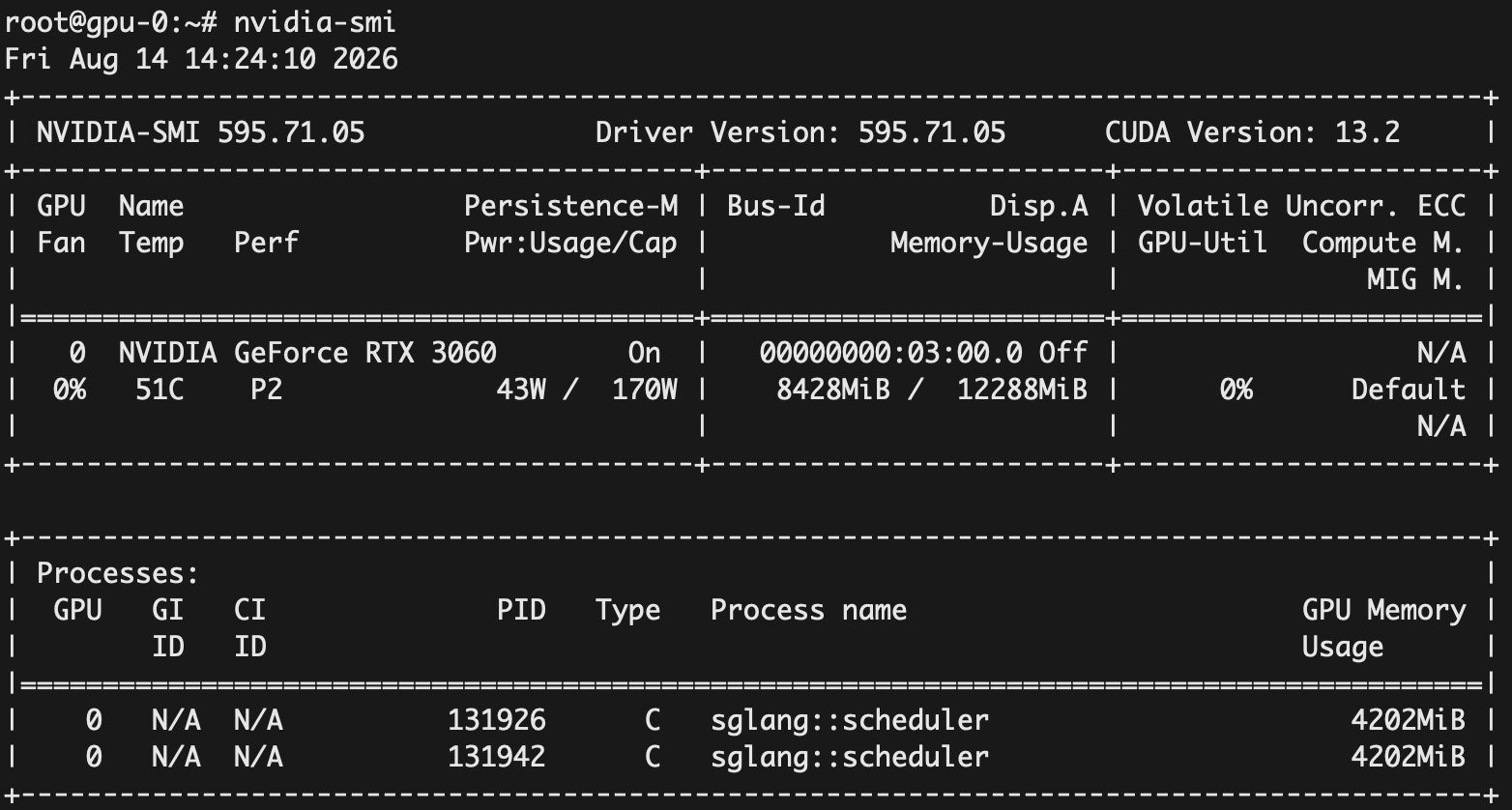
在 GPU 节点查看存在两个 vLLM 服务:
向 qwen-embed 发送请求:
1 2 3 4 5 6 7 8 9 10 curl -fsS -H "Host: qwen-embed-kserve-lab.example.com" http://<node-ip>/v1/embeddings \ -H 'Content-Type: application/json' \ -d '{ "model": "qwen-embed", "input": [ "KServe 管理模型服务。", "HAMi 管理 GPU 共享。" ], "encoding_format": "float" }'
通过 Python 脚本测试 RAG:
1 2 3 4 5 6 7 8 9 10 11 12 13 14 15 16 17 18 19 20 21 22 23 24 25 26 27 28 29 30 31 32 33 34 35 36 37 38 39 40 41 42 43 44 45 46 47 48 49 50 51 52 53 54 55 56 57 58 59 60 61 62 63 64 65 66 67 68 69 70 71 72 73 74 75 76 77 78 79 80 81 82 83 84 85 86 import argparseimport jsonimport mathfrom urllib.error import HTTPErrorfrom urllib.request import Request, urlopendef post (base, path, payload ): request = Request( base.rstrip('/' ) + path, data=json.dumps(payload, ensure_ascii=False ).encode(), headers={'Content-Type' : 'application/json' } ) try : with urlopen(request, timeout=180 ) as response: return json.load(response) except HTTPError as error: raise RuntimeError(f'HTTP {error.code} : {error.read().decode()} ' ) from error def unit (vector ): norm = math.sqrt(sum (x * x for x in vector)) if not norm: raise ValueError('Zero embedding' ) return [x / norm for x in vector] def main (): parser = argparse.ArgumentParser() parser.add_argument('--chat-url' , default='http://<qwen-chat-cluster-ip>' ) parser.add_argument('--embed-url' , default='http://<qwen-embed-cluster-ip>' ) parser.add_argument('--question' , default='为什么修改单卡 GPU 服务时,新 Pod 可能一直 Pending?' ) opts = parser.parse_args() documents = [ 'KServe Standard 模式通过 Kubernetes Deployment 和 Service 管理模型服务,' '本实验固定一个副本,没有配置自动缩容到零。' , 'HAMi 使用 nvidia.com/gpumem 指定每个 GPU 份额的显存额度,' 'nvidia.com/gpucores 指定算力配额。份额数不是物理 GPU 数量。' , '单 GPU 服务采用 RollingUpdate 时,新旧 Pod 可能同时申请 GPU。' '如果旧 Pod 占满显存或算力预算,新 Pod 就会 Pending。' '实验使用 Recreate,先释放旧 Pod 再创建新 Pod,但更新会中断服务。' , 'ModelScope 下载 Job 将模型保存到本地 PV。推理 Pod 挂载 PVC,' '可在重启后复用文件。local PV 绑定 gpu-0,不提供跨节点数据复制。' , ] question = 'Instruct: Retrieve the relevant passage that answers the question.\nQuery: ' + opts.question response = post(opts.embed_url, '/v1/embeddings' , { 'model' : 'qwen-embed' , 'input' : [question] + documents, 'encoding_format' : 'float' }) data = sorted (response['data' ], key=lambda item: item['index' ]) if len (data) != len (documents) + 1 : raise ValueError('Unexpected embedding count' ) vectors = [unit(item['embedding' ]) for item in data] scores = [sum (x * y for x, y in zip (vectors[0 ], v)) for v in vectors[1 :]] best = sorted (range (len (documents)), key=lambda index: scores[index], reverse=True )[:2 ] context = '\n' .join(f'[{i + 1 } ] {documents[i]} ' for i in best) print ('检索到的资料:' ) for i in best: print (f'[{i + 1 } ] cosine={scores[i]:.4 f} {documents[i]} ' ) answer = post(opts.chat_url, '/v1/chat/completions' , { 'model' : 'qwen-chat' , 'temperature' : 0 , 'max_tokens' : 300 , 'messages' : [ {'role' : 'system' , 'content' : '只根据提供的资料回答问题,并引用资料编号。资料不足就说不知道。' }, {'role' : 'user' , 'content' : f'资料:\n{context} \n\n问题:{opts.question} ' }, ] }) print ('\n回答:\n' + answer['choices' ][0 ]['message' ]['content' ]) if __name__ == '__main__' : main()
使用 InferenceGraph 实现模型编排和路由 使用 InferenceGraph 编排 qwen-chat 和 qwen-embed,并进行路由。
两个服务的 OpenAI 请求格式不同:Chat 需要 messages,Embedding 需要 input。因此不适合直接做 Ensemble,也不能把 Embedding 响应直接作为下一步聊天请求。这里使用请求中已有的 model 字段进行选择,每次只调用一个兼容的后端:
1 2 3 ┌→ qwen-chat/v1/chat/completions Request → Switch -> 其他 model 返回 404 └→ qwen-embed/v1/embeddings
创建 InferenceGraph:
1 2 3 4 5 6 7 8 9 10 11 12 13 14 15 16 17 18 19 20 21 22 23 24 25 26 27 28 29 30 31 32 33 34 cat <<EOF | kubectl apply -f - apiVersion: serving.kserve.io/v1alpha1 kind: InferenceGraph metadata: name: qwen-router namespace: kserve-lab annotations: serving.kserve.io/deploymentMode: Standard spec: minReplicas: 1 maxReplicas: 1 resources: requests: cpu: 100m memory: 64Mi limits: cpu: '1' memory: 256Mi routerTimeouts: serverRead: 30 serverWrite: 180 serviceClient: 120 serverIdle: 180 nodes: root: routerType: Switch steps: - name: chat condition: '[@this].#(model=="qwen-chat")' serviceUrl: http://qwen-chat-predictor.kserve-lab.svc.cluster.local/v1/chat/completions - name: embed condition: '[@this].#(model=="qwen-embed")' serviceUrl: http://qwen-embed-predictor.kserve-lab.svc.cluster.local/v1/embeddings EOF
测试 Chat:
1 2 3 4 5 6 7 8 9 10 11 curl -fsS http://<qwen-router-cluster-ip> \ -H 'Content-Type: application/json' \ -d '{ "model": "qwen-chat", "messages": [ {"role": "system", "content": "你是一名 AI 专家。"}, {"role": "user", "content": "用一句话解释大模型是什么。"} ], "temperature": 0, "max_tokens": 256 }'
测试 Embedding:
1 2 3 4 5 6 7 8 9 curl -fsS http://<qwen-router-cluster-ip> \ -H 'Content-Type: application/json' \ -d '{ "model": "qwen-embed", "input": [ "Kubernetes 管理容器编排。" ], "encoding_format": "float" }'
测试没有匹配的分支,会返回 404:
1 2 3 4 5 6 curl -i http://<qwen-router-cluster-ip> \ -H 'Content-Type: application/json' \ -d '{ "model": "unknown", "input": "test" }'
使用 ClusterStorageContainer 定义模型下载配置 KServe 在真正启动模型 Server(如 vLLM、Triton、Sklearn Server)之前,需要先把模型从 S3 下载到 Pod 本地。这个下载工作通常由一个 Storage Initializer InitContainer 完成。
ClusterStorageContainer 用于配置这个 InitContainer。默认情况下,KServe 会创建名为 default 的 ClusterStorageContainer,可以直接使用。
此处测试创建一个 InferenceService,并使用 ClusterStorageContainer 下载模型。
目前 ClusterStorageContainer 暂不支持 ModelScope,而大陆环境从 Hugging Face 下载模型速度较慢,因此这里创建一个 ClusterStorageContainer 进行测试,并为其配置代理以加速模型下载。后续版本会支持:https://github.com/kserve/kserve/pull/5330
创建 ClusterStorageContainer:
1 2 3 4 5 6 7 8 9 10 11 12 13 14 15 16 17 18 19 20 21 22 23 24 25 26 27 28 29 30 31 32 33 34 35 36 37 38 39 40 41 cat <<EOF | kubectl apply -f - apiVersion: serving.kserve.io/v1alpha1 kind: ClusterStorageContainer metadata: name: hf-proxy spec: workloadType: initContainer supportedUriFormats: - prefix: hf:// container: name: storage-initializer image: kserve/storage-initializer:v0.20.0 imagePullPolicy: IfNotPresent env: - name: HTTP_PROXY value: http://172.16.16.12:10808 - name: HTTPS_PROXY value: http://172.16.16.12:10808 - name: http_proxy value: http://172.16.16.12:10808 - name: https_proxy value: http://172.16.16.12:10808 - name: NO_PROXY value: localhost,127.0.0.1,.svc,.svc.cluster.local,10.0.0.0/8,172.16.0.0/12 - name: no_proxy value: localhost,127.0.0.1,.svc,.svc.cluster.local,10.0.0.0/8,172.16.0.0/12 resources: requests: cpu: 100m memory: 100Mi limits: cpu: "1" memory: 1Gi securityContext: allowPrivilegeEscalation: false capabilities: drop: - ALL privileged: false runAsNonRoot: true EOF
创建 InferenceService:
1 2 3 4 5 6 7 8 9 10 11 12 13 14 15 16 17 18 19 20 21 22 23 24 25 26 27 28 29 30 31 32 33 34 35 36 37 38 39 40 41 cat <<EOF | kubectl apply -f - apiVersion: serving.kserve.io/v1beta1 kind: InferenceService metadata: name: hf-qwen-chat namespace: kserve-lab annotations: serving.kserve.io/deploymentMode: Standard storage.kserve.io/readonly: "true" spec: predictor: minReplicas: 1 maxReplicas: 1 deploymentStrategy: type: Recreate # 指定 ClusterStorageContainer storageContainerName: hf-proxy volumes: - name: dshm emptyDir: medium: Memory sizeLimit: 1Gi model: modelFormat: name: huggingface runtime: vllm-chat-cluster-runtime storageUri: hf://Qwen/Qwen2.5-0.5B-Instruct resources: requests: cpu: "1" memory: 3Gi nvidia.com/gpu: "1" nvidia.com/gpumem: "8192" nvidia.com/gpucores: "100" limits: cpu: "4" memory: 7Gi nvidia.com/gpu: "1" nvidia.com/gpumem: "8192" nvidia.com/gpucores: "100" EOF
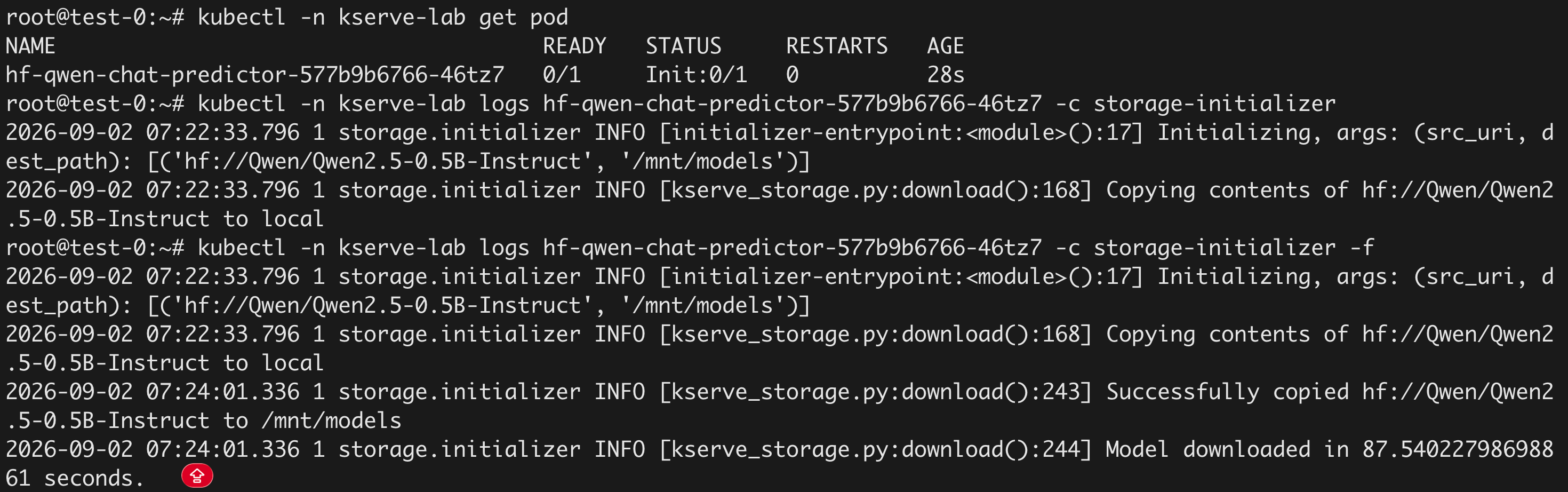
启动 vLLM 之前,会先启动一个 InitContainer 下载模型: